AI Media MCP Server and CLI: Setup and Pricing
One MCP server for AI image, video, and music generation in Claude Code, Cursor, or ChatGPT, plus the uai CLI. Free to connect; you pay per generation.

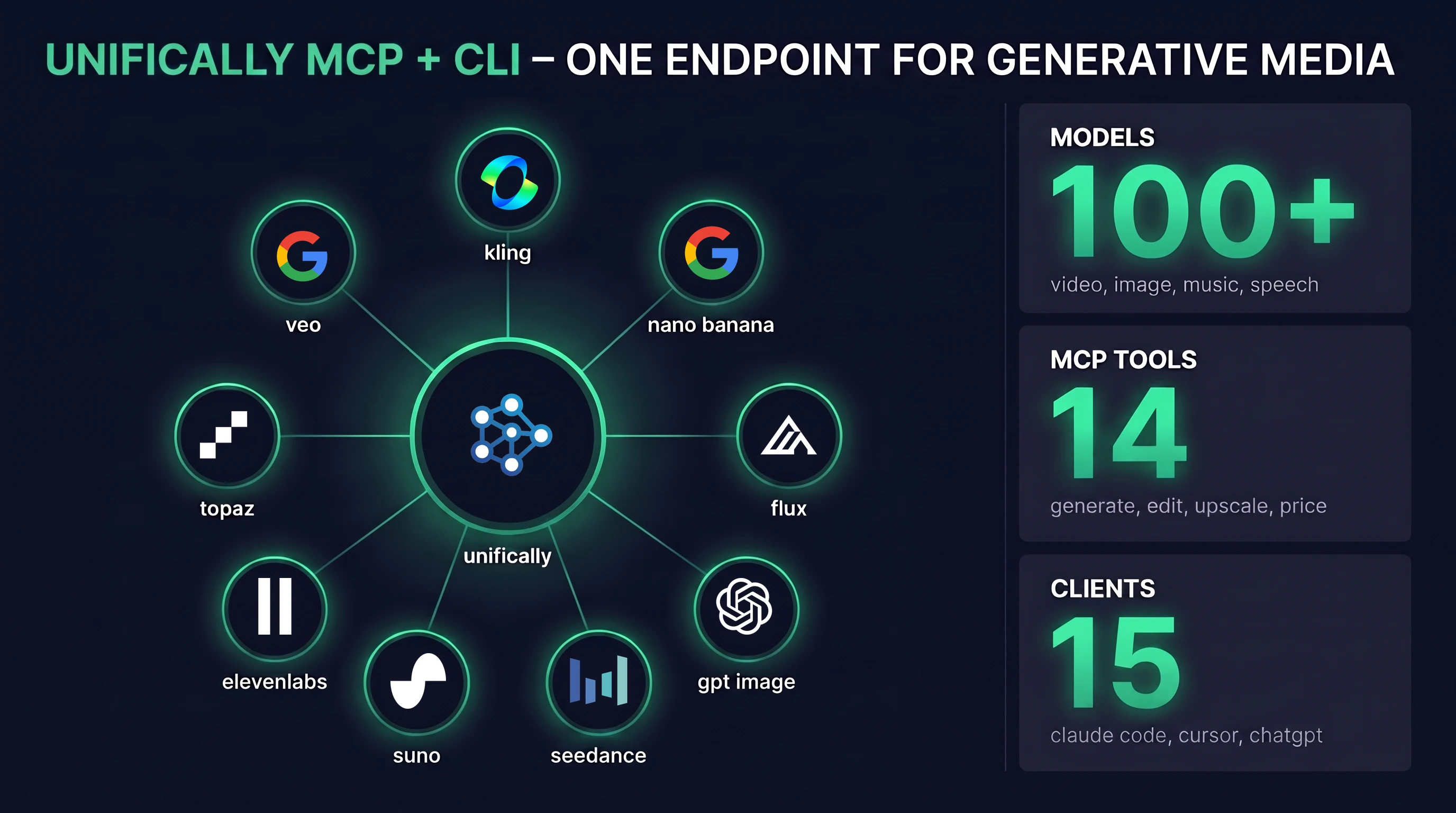
Unifically now offers two new ways to reach its catalog of 100+ generative models: a hosted MCP server at mcp.unifically.com/mcp and an open-source CLI installed with one npm command. If you have been looking for an image generation MCP server that also handles video, music, and speech, this is one endpoint instead of four separate servers. Both launched in July 2026, both are free to use, and both bill generations to your existing API key at the same per-task prices as the API.
TL;DR: Add
https://mcp.unifically.com/mcpto Claude Code, Cursor, ChatGPT, or any of 15 supported MCP clients and your assistant gets 14 tools for image, video, music, and speech generation across 100+ models (Veo, Kling, Nano Banana, Flux, Suno, ElevenLabs, Topaz). Or runnpm install -g @unifically/cliand generate from the terminal withuai run. Access is free; you pay per generation. Today's dry-run prices: a Flux.2 Pro image is $0.013, a Nano Banana Pro 2K image is $0.07, a Suno song is $0.06, and an 8-second Veo 3.1 Fast video is $0.30.
What is the Unifically MCP server?
MCP (Model Context Protocol) is the open standard that lets AI assistants call outside tools. Claude, Cursor, ChatGPT, and most coding agents speak it. The Unifically MCP server is a remote MCP server, hosted at mcp.unifically.com/mcp over streamable HTTP, so there is nothing to install or run locally. A legacy SSE endpoint at mcp.unifically.com/sse covers older clients.
Connect it once and your assistant can make media in chat. Ask for a 9:16 video of a sunset over Tokyo and the finished file comes back in the conversation. Behind the single endpoint sit the same 100+ models the Unifically API serves: Veo 3.1, Kling 3.0 Omni, Nano Banana Pro, Flux.2, GPT Image 2, SeeDance 2.0, Suno, ElevenLabs, and Topaz upscalers among them.
That breadth is the point. Most servers in this space do one thing: a Flux-only image generation MCP, a Veo MCP wrapper, a Suno MCP for music. Each needs its own config block and its own key. Here, image generation, video generation, music generation, and speech ride one connection and one bill.
Connect the MCP server to Claude Code, Cursor, or ChatGPT
Setup is one snippet per client, and the /mcp page has copy-paste versions for 15: Claude Code, Codex, Gemini CLI, GitHub Copilot, OpenCode, claude.ai, ChatGPT, Goose, Cursor, VS Code, Antigravity, Kiro, Windsurf, Kimi Code, and Cline. Anything else that speaks MCP, Claude Desktop and OpenClaw included, takes the standard JSON config. First grab an API key, then:
Claude Code (one command):
claude mcp add unifically https://mcp.unifically.com/mcp \
  --transport http \
  --header "Authorization: Bearer sk-..."
Cursor (~/.cursor/mcp.json), and most JSON-config clients:
{
  "mcpServers": {
    "unifically": {
      "url": "https://mcp.unifically.com/mcp",
      "headers": { "Authorization": "Bearer sk-..." }
    }
  }
}
claude.ai and ChatGPT take a connector URL instead, because a pasted URL carries no headers:
https://mcp.unifically.com/mcp?api_key=sk-...
There is no OAuth and no account linking. The MCP server API key travels with every request, three ways: an Authorization: Bearer header, an X-API-Key header, or the ?api_key= query parameter for URL-only clients. The key is the whole setup, and usage bills only to your account.
The 14 tools: image, video, music, and speech
Every tool name below is what your assistant actually sees. Generation tools wait for the result and return the media URL; long jobs like high-quality video and full songs return a task_id right away, and the assistant polls get_task until they finish.
| Tool | What it does | Key parameters |
|---|---|---|
generate_image | Text to image MCP generation, plus reference-image edits | prompt, image_urls, resolution, aspect_ratio |
generate_video | Text or image to video | prompt, image_url, duration, aspect_ratio |
generate_music | Full Suno suite: songs, covers, extends, stems | prompt, mode, instrumental, audio_url |
generate_audio | Speech, sound effects, dialogue, transcription | model, prompt, voice_id, audio_url |
edit_video | Edit an existing video with a change prompt | video_url, prompt, image_urls |
extend_video | Lengthen a generated video | task_id, model, prompt |
upscale_media | Upscale images or video | image_url, video_url, upscale_factor |
upload_file | Turn a local file into a CDN URL models accept | file_path, url, base64 |
list_models / list_resources | Browse the catalog, voices, styles | category, provider, resource |
list_tasks / get_task | Task history and polling | task_id, status, page |
dry_run_cost / check_balance | Price a job before spending; check funds | model, input |
dry_run_cost matters more than it looks. The server's built-in guidance tells assistants to quote a price before pricey jobs and never chain paid steps you didn't request. Every result also reports what it actually cost.
Claude Code image generation, step by step
The most common search that lands people here is Claude Code image generation, so here is the exact flow after the one-line setup above. You type a request; the agent does the rest through the Claude Code image generation MCP tools:
› "make a 9:16 video of a sunset over Tokyo"
⚙ dry_run_cost · google/veo-3.1-fast · duration=8
  est $0.30
⚙ generate_video · prompt="sunset over Tokyo" · aspect_ratio=9:16
  → task_9f27c1 · processing
⚙ get_task · task_id=task_9f27c1
✓ https://files.unifically.com/v/sunset-tokyo-9f27.mp4 · $0.30
Images are simpler still: generate_image returns the finished URL in the same tool call. Local files work too. The upload_file tool converts anything on disk into a files.unifically.com URL, so "restyle this screenshot" works without you hosting anything. The same flow runs in Cursor, Windsurf, or ChatGPT; the tools are identical in every client.
The uai CLI: generate images from the terminal
The Unifically CLI is the same catalog without an agent in the loop. It is an MIT-licensed npm package that installs two identical commands, uai and unifically, on macOS, Linux, and Windows (Node 18+):
npm install -g @unifically/cli
uai onboard
uai onboard connects your key and loads the model catalog. After that, one command per generation:
uai run black-forest-labs/flux.2-pro \
  prompt="a fox" \
  aspect_ratio=1:1 \
  --sync
uai run google/veo-3.1-fast \
  prompt="a cat walking on the beach at sunset" \
  duration=8 \
  --sync
--sync polls to completion and downloads the file; without it you get a task id back immediately for scripts. A few design choices make this a genuine AI image generation CLI rather than a curl wrapper:
- httpie-style inputs.
key=valuefor anything,key:=jsonfor arrays,key=@photo.pngto upload a local file inline, dot notation (messages.0.role=user) for nested objects. - Media flags.
--images,--videos,--first-imagemap files onto the right model fields, uploading local paths automatically. - Cost preflight.
uai costprices any job as a dry run, and--confirmshows the estimate and asks before submitting. - Interactive sessions. Plain
uaiopens a REPL with a sticky model, sticky params, tab completion, and paste-an-image support ([Image 1]). - Agent mode.
uai execemits JSONL events on stdout, and--jsonkeeps stdout clean forjq, which makes it a solid citizen among AI CLI tools in scripts and CI.
It is an AI video CLI and a music CLI too: the same run command drives Veo, Kling, Suno, and ElevenLabs. LLMs work as well, streamed to the terminal: uai run openai/gpt-5.5 "explain quantum tunneling", or pipe a file in as the prompt.
What the MCP server and CLI cost
Both are free. There is no subscription and no markup for using them; you pay per generation at the same prices as the Unifically API, billed to your key. We priced the examples in this post with dry_run_cost on July 26, 2026, at model defaults:
| Job | Model | Dry-run price |
|---|---|---|
| One image | black-forest-labs/flux.2-pro | $0.013 |
| One 2K image | google/nano-banana-pro | $0.07 |
| One song | suno-ai/music | $0.06 |
| 8s of video | google/veo-3.1-fast | $0.30 |
Prices vary with resolution and duration, which is exactly why the dry-run tools exist: ask your assistant to price the job first, or run uai cost yourself. Sign-up includes free credits, so you can try the image tools without adding a card.
Where it beats a single-model MCP server, and where it doesn't
Most results for "image generation mcp server" are single-model GitHub projects: a Flux wrapper on Replicate, a DALL-E bridge, a local Stable Diffusion server. Against those, one hosted endpoint wins on three things: coverage (an image generation MCP, a video generation MCP, and a music generation MCP in one config block, plus speech and upscaling), zero hosting (nothing runs on your machine), and cost control (dry_run_cost before every expensive job, list_tasks for the paper trail afterward).
Where it loses, honestly: a local Stable Diffusion or ComfyUI MCP server is free per image if you own the GPU, and it works offline. If you generate thousands of draft images a day and never need video or music, run one of those. And the MCP server is media-only by design; LLM chat is not exposed as an MCP tool, since your assistant is already a language model. If you want LLM access from the same account, that lives in the CLI and the API.
FAQ
Is there a free image generation MCP server?
Connecting to the Unifically server is free, and sign-up includes free credits, so your first images cost nothing out of pocket. After that you pay per image ($0.013 for Flux.2 Pro at defaults). Fully free alternatives exist as local servers, but you supply the GPU and get images only.
Which MCP clients does it work with?
Any MCP client. The /mcp page has copy-paste configs for 16, including Claude Code, claude.ai, Claude Desktop, ChatGPT, Cursor, VS Code, Gemini CLI, Codex, Windsurf, and Cline. Streamable HTTP is the primary transport, with a legacy SSE endpoint for older clients.
Do I need OAuth or account linking?
No. Every request carries your API key in a header or query parameter. Get a key from the API keys page, paste the snippet, done.
Can Claude Code generate videos, not just images?
Yes. generate_video, edit_video, extend_video, and upscale_media are all exposed. Long renders return a task id and the agent polls get_task, so nothing is lost to proxy timeouts.
Is there a text to image MCP tool specifically?
generate_image is that tool. It takes a prompt plus optional reference images, resolution, and aspect ratio, and routes to whichever image model you or your assistant picks from the catalog.
Does the CLI replace the API?
No, it wraps it. Scripts that need raw HTTP keep using the API; the CLI covers terminal work, quick tests, and agent pipelines via uai exec. Same models, same task ids, same billing.
Start with one endpoint
If your agent setup still has a separate server for images and nothing for video or music, this collapses the stack: one remote MCP server for assistants, one CLI for the terminal, one key for both. Setup snippets live on the /mcp and /cli pages, and an agent-based alternative for chat apps is covered in our OpenClaw integration guide.
We will update this post as the tool list grows and when prices change; the dry-run figures above are re-checked against the live API on every edit.