AI Media MCP Server and CLI: Setup and Pricing
One MCP server for AI image, video, and music generation in Claude Code, Cursor, or ChatGPT, plus the uai CLI. Free to connect; you pay per generation.
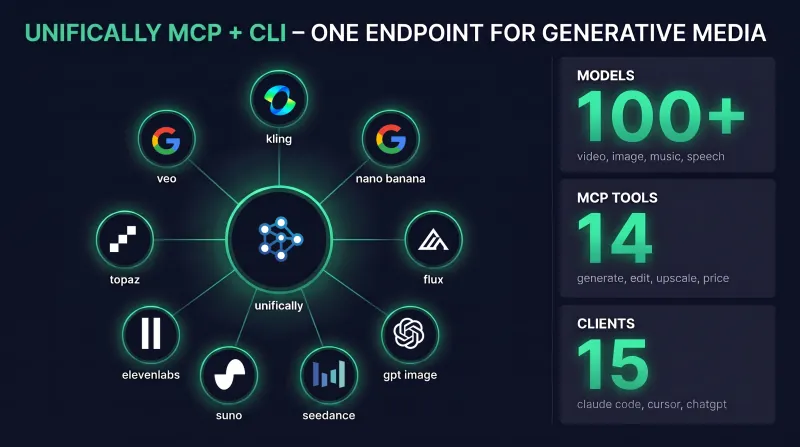
The UnificAlly MCP server is a hosted endpoint at https://mcp.unifically.com/mcp that gives Claude Code, Cursor, ChatGPT and 12 other listed clients 15 tools for images, video, music, speech and LLM chat. The @unifically/cli npm package (MIT, Node 20 or newer) reaches the same catalog from a terminal. Connecting either one is free; each generation bills to your API key at API prices.
TL;DR: Paste one config block, and your assistant can call
generate_image(Nano Banana Pro by default),generate_video(Veo 3.1 Fast by default),generate_music(Suno) and 12 more tools. For scripts,npm install -g @unifically/cligives youuai run,uai costanduai exec, with exit codes a CI job can read. A 2K Nano Banana Pro image costs $0.07, an 8-second Veo 3.1 Fast 720p video $0.30, a Suno song $0.06. Both tools can price a job before it runs, which is the feature we would pick them for.
UnificAlly MCP server and CLI: which one fits your job
- The MCP server is for a person in a chat. Your assistant picks the tool, can quote a price first, and drops the finished file URL into the conversation.
- The CLI is for code.
--jsonkeeps stdout clean,uai execstreams JSONL events, and the exit code says whether a task failed or only timed out. - Both use one API key and one balance. There is no OAuth, no separate subscription and no second account.
- Model names differ between them. The MCP tools accept short aliases (
veo,nano,kimi); the CLI wants the fullprovider/modelid and suggests the right one when you guess wrong. - One thing neither does: run offline. A local Stable Diffusion server still beats both on per-image cost if you already own the GPU.
Connect the remote MCP server: one URL, eight config dialects
Every client points at the same URL, but they disagree on the JSON key that holds it. Copy-paste snippets for all 15 sit on the MCP setup page; the table below condenses them.
| Client | Where the config goes | Key that holds the URL |
|---|---|---|
| Cursor, Antigravity, Kiro, Kimi Code | ~/.cursor/mcp.json (or the client's mcp.json) | mcpServers.unifically.url |
| Gemini CLI | ~/.gemini/settings.json | httpUrl |
| Windsurf | mcp_config.json | serverUrl |
| VS Code, GitHub Copilot | .vscode/mcp.json | servers.unifically with "type": "http" |
| Cline | cline_mcp_settings.json | url with "type": "streamableHttp" |
| OpenCode | opencode.json | mcp.unifically with "type": "remote" and "enabled": true |
| Codex | ~/.codex/config.toml | [mcp_servers.unifically] with url and http_headers |
| claude.ai, ChatGPT, Goose | connector or remote-extension screen | the URL itself, key as ?api_key= |
For Claude Code it is one command:
claude mcp add --transport http unifically https://mcp.unifically.com/mcp \
  --header "Authorization: Bearer sk-..."
And the Cursor-style block, which Claude Desktop, OpenClaw and other generic MCP clients also read:
{
  "mcpServers": {
    "unifically": {
      "url": "https://mcp.unifically.com/mcp",
      "headers": { "Authorization": "Bearer sk-..." }
    }
  }
}
The MCP server API key: three ways to send it
The server accepts the key as Authorization: Bearer sk-... (the recommended form), as X-API-Key: sk-..., or as ?api_key=sk-... on the URL. The query form exists for claude.ai and ChatGPT connectors, which take a bare URL with no custom headers. URLs tend to land in logs, so use a header wherever the client allows one. Create the key on the API keys page. Transport is Streamable HTTP; clients that only speak the older protocol can use https://mcp.unifically.com/sse.
The 15 MCP tools, their defaults and the aliases they accept
These are the tool names the server exposes today. Image, video and music generation share a few controls: wait (on by default, so the call returns the finished URL), callback_url, seed and provider_options, a pass-through for model-specific fields such as Kling multi_shots or Flux steps.
| Tool | Job | Main parameters |
|---|---|---|
generate_image | Text to image MCP calls, edits and multi-reference images | prompt, model, image_urls, resolution, aspect_ratio, negative_prompt |
generate_video | Text or image to video, start and end frames | prompt, model, image_url, end_image_url, reference_image_urls, duration, aspect_ratio |
generate_music | The Suno suite: songs, covers, extends, stems, lyrics, WAV export | prompt, mode, instrumental, tags, audio_url, clip_id |
generate_audio | Speech, sound effects, dialogue, transcription | model, prompt, voice_id, audio_url |
chat | Run another LLM (Claude, GPT, Gemini, Grok, DeepSeek, Kimi) | prompt, messages, model, json, reasoning_effort |
edit_video | Change an existing video from a prompt, or transfer motion | video_url, prompt, image_urls |
extend_video | Continue a finished video (Veo adds 8 seconds) | task_id, model, prompt |
upscale_media | Image 2x/4x, video up to 8K with Topaz | image_url, video_url, upscale_factor |
upload_file | Turn a local or remote file into a URL models accept | content_type, url |
list_models / list_resources | Catalog, voices and other provider resources | category, provider, resource |
list_tasks / get_task | History, polling, recovering a timed-out result | task_id, status, page |
dry_run_cost / check_balance | Price a job without running it; read the balance | model, input |
Aliases save typing in chat. For images: nano-banana-pro (the default), nano-banana-2, flux, gpt-image, qwen, seedream, kling-image, grok-image. For video: veo (Veo 3.1 Fast, with native audio), veo-quality, veo-lite, kling, kling-omni, hailuo, seedance, grok-video. For chat: claude (Claude Sonnet 5.5, the default), opus, fable, gpt, gemini, deepseek, kimi. On November 16, 2026, list_models returned 180 catalog entries, because every Suno and ElevenLabs operation has its own id. The aliases map to models with their own pages, among them the Flux.2 Pro API, GPT Image 2, SeeDance 2.0, Suno, ElevenLabs and the Topaz video upscaler.
Video generation MCP calls: waiting, polling or a webhook
A Veo MCP request that takes longer than the client's timeout has two exits. Set wait: false and the tool returns a task_id at once for get_task to poll; or pass callback_url and the server POSTs the result when the task ends. The webhook body puts the media under data, not output, and adds error_message when the status is failed:
{
  "task_id": "...",
  "status": "completed",
  "data": { "video_url": "https://files.unifically.com/..." }
}
Music generation MCP: the Suno MCP modes
generate_music takes a mode: music (default), cover, extend (needs continue_at), add-vocals, add-instrumental, stems and stems-all (need a clip_id), lyrics, sound and wav. Suno's version defaults to chirp-bluejay. That makes it a full Suno MCP rather than a song button: an assistant can write lyrics, make the track, split stems and export WAV in one conversation.
Local files go through upload_file, never base64
Generation tools take only public https URLs. For a file on your disk, the assistant calls upload_file with its MIME type, gets back a one-time upload_url, and PUTs the file there with plain curl and no API key; the response already carries the final file_url. Only image, video and audio types are accepted, and there is no base64 path, so a screenshot reaches the model at full quality instead of being re-encoded through the chat.
Claude Code image generation with a price check first
The searches that bring most people here are about Claude Code image generation, so this is the flow after the one-line setup. Request a vertical Tokyo sunset video and a well-behaved session runs two tools:
› make a 9:16 video of a sunset over Tokyo
⚙ dry_run_cost  model=veo  input={prompt, aspect_ratio: "9:16", duration: 8}
  → {"model": "google/veo-3.1-fast", "cost_usd": …}
⚙ generate_video  prompt="sunset over Tokyo"  aspect_ratio=9:16
  → task finished, video URL returned
We ran the price step for real on November 16, 2026. The alias veo came back resolved to google/veo-3.1-fast, and nano to google/nano-banana-pro, with no task created and nothing charged. One trap: dry_run_cost wants the model's raw API field names, which can differ from the friendly tool parameters, and a mis-shaped input prices the model's defaults instead of your job. Check the field names on the model's page at docs.unifically.com when the quote looks off.
The server's built-in guidance tells assistants to quote before expensive jobs and never to chain paid steps you did not ask for. Every result reports what it cost. For LLM calls through chat, there is nothing to dry-run, since cost depends on tokens; the charge appears afterward in list_tasks under the llm category. The same Claude Code image generation MCP tools behave the same way in Cursor, Windsurf and ChatGPT.
The uai CLI: generate images from terminal sessions and scripts
The UnificAlly CLI installs two identical commands, uai and unifically:
npm install -g @unifically/cli
uai onboard
uai onboard validates your key, sets an output folder and loads the catalog. In CI, skip it and export UNIFICALLY_API_KEY. One command per job:
uai run black-forest-labs/flux.2-pro prompt="a fox" aspect_ratio=1:1 --sync
uai run google/veo-3.1-fast prompt="a cat walking on the beach at sunset" duration=8 --sync
run is asynchronous by default and prints a task id; --sync polls every 3 seconds (600-second timeout by default) and downloads the file as <model>-<taskid>.<ext>. That is the whole AI image generation CLI flow, and the same verb drives the AI video CLI case, Suno and ElevenLabs.
Inline dot notation and the other input operators
Arguments are httpie-style, and each operator solves a real typing problem:
| Syntax | What it sends | Example |
|---|---|---|
key=value | auto-typed: numbers, true/false, null | seed=42 |
key==value | a string, never converted | version==3.0 stays "3.0" |
key:=json | strict JSON for arrays and objects | urls:='["a","b"]' |
key=@path | uploads the file first, sends its URL | image_url=@photo.png |
a.0.b=value | inline dot notation for nested fields | messages.0.role=user |
Media flags map local files to the right field: --images fills image_urls[], --image fills image_url, and --first-image / --last-image become start_image_url / end_image_url (Kling video models get start_frame_url automatically). LLMs run through the same verb and stream to the terminal, for example uai run openai/gpt-5.5 "write a commit message for this diff", with system=, temperature= and --images for vision.
Exit codes and spend gates for scripts and agents
This is what makes it one of the more usable AI CLI tools inside a pipeline:
| Exit code | Meaning |
|---|---|
| 0 | done |
| 2 | usage or validation error, no task created |
| 3 | auth problem |
| 4 | API error |
| 5 | timed out while the task is still running (resume with uai wait <id>) |
| 130 | Ctrl+C; the task keeps running server-side |
Code 5 is the one to handle: a long video that outlives --timeout has not failed, so retrying it pays twice. uai cost previews a price at no charge. --confirm asks Y/n before spending, and in a script or with --json it errors instead of guessing, so a spend gate cannot fail open. When a run is refused, the status code tells you why: 402 means your balance is short, while a credits complaint carrying any other status is a capacity problem further up the chain. The CLI looks at your balance and names the case for you.
uai exec runs any command as a JSONL stream (start, submitted, progress, delta for LLM text, upload, saved, result, error), with progress sent on each status change plus a heartbeat every 30 seconds. The package also includes a ready-made skill file for Claude Code and Cursor: look for skill/SKILL.md inside the globally installed package (npm root -g prints where that is).
What the MCP server and CLI cost per job
Connecting costs nothing; generations bill at the same rates as the UnificAlly API. The jobs from this post:
| Job | Model id | Our rate |
|---|---|---|
| One 1 MP image | black-forest-labs/flux.2-pro | $0.027 |
| One 2K image | google/nano-banana-pro | $0.07 |
| One song | suno-ai/music | $0.06 |
| 8 seconds of 720p video | google/veo-3.1-fast | $0.30 |
A batch of ten 2K product images on Nano Banana Pro comes to $0.70; ten 8-second Veo drafts come to $3. A new account starts with $0.50 of balance, enough for 7 of those 2K images. Pricier tiers (Veo 3.1 Quality, 4K images) are where dry_run_cost and uai cost earn their keep.
Where one remote endpoint beats a single-model image generation MCP server
Most results for "image generation mcp server" (and its "image generation mcp server free" variant) are single-model projects: a Flux wrapper on Replicate with one generate_image tool, servers with fixed square, landscape and portrait shortcuts, or free bring-your-own-key servers for Gemini and GPT Image. For MCP image generation plus everything else, a hosted endpoint covers image, video, music, speech and upscaling from one config block, runs nothing on your machine, and checks cost before the job runs.
It loses in two places. A local Stable Diffusion or ComfyUI MCP server costs nothing per image once you own the GPU, and it works offline; if you make thousands of draft stills a day and never touch video, run one of those. And a bring-your-own-key server lets you use a provider account you already pay for, which ours does not.
AI Media MCP Server and CLI FAQ
Is there a free image generation MCP server?
Connecting to the UnificAlly MCP server is free, and new accounts get $0.50 of balance, so the first images cost nothing out of pocket. After that a 1 MP Flux.2 Pro image is $0.027. Fully free options are local servers where you supply the GPU.
Which MCP clients does it work with?
Any client that speaks MCP over Streamable HTTP. The setup page has snippets for 15, including Claude Code, Codex, Gemini CLI, Cursor, VS Code, Windsurf, Cline, claude.ai and ChatGPT. Claude Desktop and OpenClaw read the standard JSON block, and older clients can use the SSE endpoint.
Do I need OAuth or account linking?
No. The key travels with every call, in an Authorization: Bearer header, an X-API-Key header, or an api_key query parameter for URL-only connectors. Get a key from the API keys page and paste the snippet for your client.
Can Claude Code generate videos, not just images?
Yes. generate_video, edit_video, extend_video and upscale_media are all exposed, with Veo 3.1 Fast as the default video model and Kling 3.0 Omni one alias away. Long jobs can return a task_id or post to a webhook, so a timeout does not lose the result.
Is there a text to image MCP tool specifically?
generate_image is that tool. It takes a prompt plus optional reference images, resolution, aspect ratio and negative prompt, defaults to Nano Banana Pro, and switches model by alias, for example flux, gpt-image, seedream or qwen.
Does the CLI replace the API?
No, it wraps it. Code that needs raw HTTP keeps calling the API directly; the CLI covers terminal work, quick tests and agent pipelines through uai exec. Models, task ids and billing are the same in both.
Pick by who is driving
A person asking for media in Claude Code, Cursor or ChatGPT: connect the MCP server. A script, cron job or agent that shells out: install the CLI and branch on its exit codes. A chat-app agent on your own machine: our OpenClaw integration guide covers that setup. The models behind all three include the Veo 3.1 API, the Nano Banana Pro API and the Kling 3.0 Omni API.