GPT Image 2.6 vs GPT Image 2.5: Sharper Pictures at 3.3x the Token Bill
We ran GPT Image 2.6 vs 2.5 through 6 matched API tests: 2.6 draws finer detail and cleaner text but spends 3.3x the output tokens, and Arena still prefers 2.5.
GPT Image 2.6 draws a sharper picture than GPT Image 2.5, and charges you for it. We sent both versions the same six test prompts on November 15, 2026. The newer model spelled a dense poster perfectly and drew finer skin and fabric, yet it spent about 3.3 times the output tokens per image and lost our counting and editing tests.
TL;DR: Keep GPT Image 2.5 as your default. It cost roughly a third as much per image in our runs, kept product edits closer to the original and still holds first place on the Arena text-to-image board. Send text-heavy layouts and close-up photography to GPT Image 2.6, and draft at
quality: "low", which cut 2.6's 1K output from 1,450 tokens to 825.
- Same prompt, same settings: GPT Image 2.6 used 1,450 output tokens at 1K medium where 2.5 used 440.
- Sharpness rose by 1.4x to 2x on average across three photo tests.
- Poster text: 300 of 300 characters right on 2.6, 292 of 300 on 2.5.
- Counting objects: 2.5 got the totals right in 3 of 4 runs, 2.6 in 2 of 4.
- Arena voters rank 2.5 Sunburst 23 points above 2.6 Sunburst.
Inside ChatGPT the release is called ChatGPT Images 2.6, and the API names each version twice (Flare and Sunburst), so you will also see this comparison written as ChatGPT Images 2.6 vs 2.5 or gpt-image-2.6 vs gpt-image-2.5. All of those point at the same two model generations.
GPT Image 2.6 spends 3.3x the tokens of 2.5 on the same picture
OpenAI bills both generations at identical per-token rates. What changed is how many tokens a picture consumes. We read the token count off each finished task in our history:
| Request (medium quality) | GPT Image 2.6 output tokens | GPT Image 2.5 output tokens | Ratio |
|---|---|---|---|
| Flare, 1K square | 1,450 | 440 | 3.3x |
| Sunburst, 2K square | 2,945 | 893 | 3.3x |
| Sunburst, 2K square, transparent PNG | 2,944 | 892 | 3.3x |
| Sunburst, 2K, 3:4 poster | 1,838 | 557 | 3.3x |
| Sunburst, 2K, 3:2 photo | 1,519 | 461 | 3.3x |
The ratio barely moved across sizes, shapes or the transparency flag, so it looks like a property of the model and not of any one setting. A developer on OpenAI's community forum posted 344 tokens for 2.5 against 1,136 for 2.6 on a medium image the week 2.6 launched, the same 3.3x.
Billed amounts followed. Five of our six prompts cost between 3.2x and 3.3x as much on 2.6; the product edit, where both models also paid to read a 2K reference photo, cost 2.6x. In dollars, a 1K Flare image billed $0.0393 on 2.6 against $0.0120 on 2.5, and a 2K Sunburst square billed $0.0797 against $0.0243.
Flare and Sunburst bill both models the same token rates on UnificAlly: $27/1M tokens for image output, $7.20/1M tokens for image input and $4.50/1M tokens for text. At the output token counts we measured for a square image at medium quality (1,450 at 1K, 2,945 at 2K, 4,895 at 4K), the GPT Image 2.6 cost per image comes to about $0.03915 at 1K, $0.079515 at 2K and $0.132165 at 4K, the same on Flare and Sunburst.
We also tried the two knobs that might bring 2.6 down. Setting thinking_level to low left the count at 1,450 tokens. Setting quality to low dropped it to 825, still almost twice what 2.5 spends at medium.
How the six GPT Image 2.6 vs 2.5 tests were run
Each GPT Image 2.6 vs GPT Image 2.5 pair went through the UnificAlly API with identical text, aspect ratio, resolution and quality: "medium". Five tests ran twice per model; the transparency test ran once. That is 22 generations, plus the two extra 2.6 runs above. For each output we measured the real pixel size, the alpha channel, characters rendered, objects counted, a sharpness score (variance of the Laplacian, where higher means more fine detail) and pixel change inside a protected area.
| Test | GPT Image 2.6 | GPT Image 2.5 | Better |
|---|---|---|---|
| Poster text, 150 characters, 2 runs | 300 of 300 correct | 292 of 300 | 2.6 |
| Count 7 apples, 4 pears, 3 lemons (Sunburst, 2K) | 1 of 2 correct | 2 of 2 correct | 2.5 |
| Same count (Flare, 1K) | 1 of 2 correct | 1 of 2 correct | Even |
| Hands and pen, sharpness score | 102 and 143 | 61 and 63 | 2.6 |
| Signature drawn under the nib | 2 of 2 runs | 0 of 2 runs | 2.6 |
| Transparent PNG, 1 run | Real alpha, 41.8% fully clear | Real alpha, 49.1% fully clear | Even |
| Background edit, change in the label area | 11.6 and 11.7 of 255 | 8.7 and 9.1 of 255 | 2.5 |
On picture quality, 2.6 took three tests, 2.5 took two, and two came out even. Cost went to 2.5 in every row.
Two runs per prompt shows where each generation tends to land; it does not prove repeatability, and we did not time the requests.
Where GPT Image 2.6 beats 2.5: small text and close-up detail
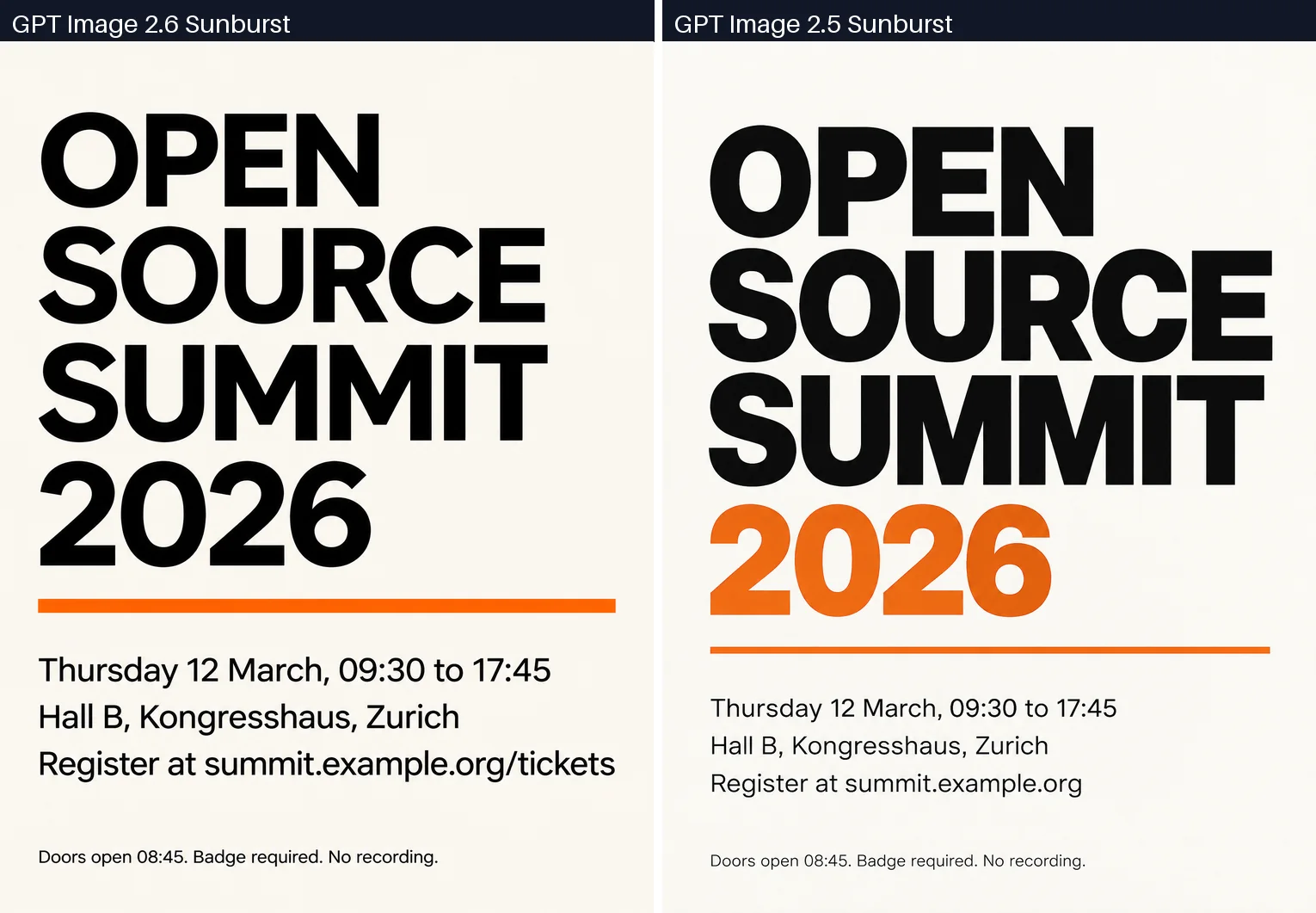
Dense poster text on GPT Image 2.6 and 2.5
Our poster prompt asked for a headline, three lines of event details and a footer line in tiny type. At native resolution both generations rendered the footer cleanly. The difference was discipline. In its second run, 2.5 shortened summit.example.org/tickets to summit.example.org and painted the year orange, though the prompt asked for black text with a single orange rule. The newer model followed the brief both times.
Skin, fabric and a working fountain pen
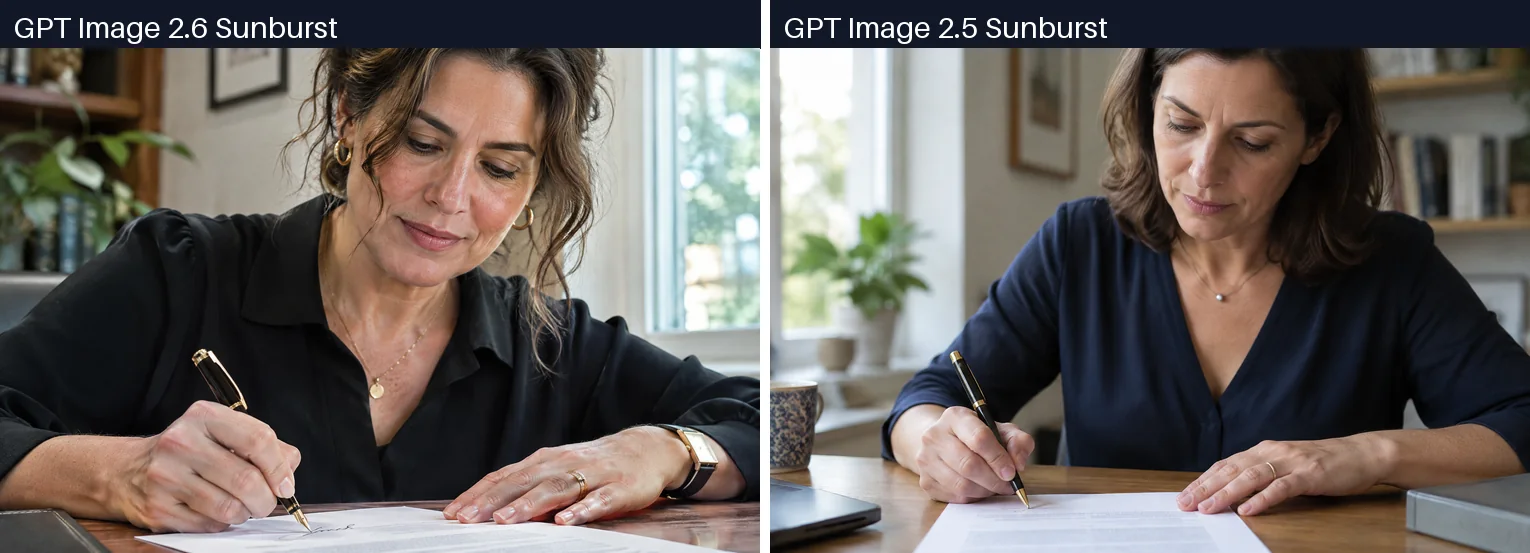
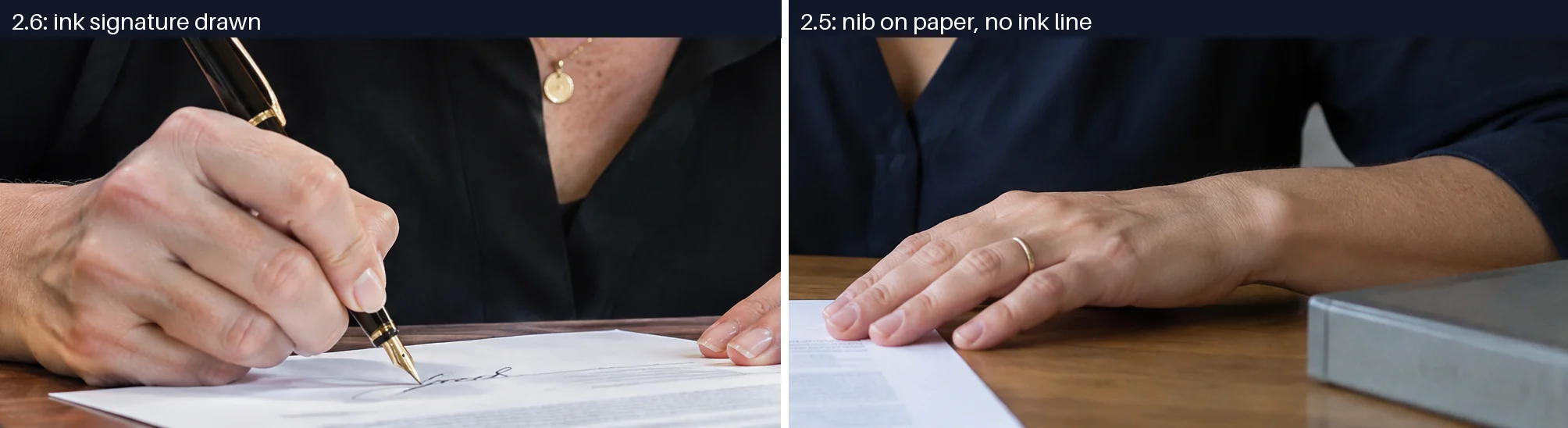
The prompt described a woman in her forties signing a document, both hands on the desk. All four outputs had five fingers in the right places. Version 2.6 added pores, fabric weave and, in both runs, an actual ink signature trailing from the nib. The older model placed the nib on the page with nothing written. Its images also read softer, which the sharpness scores confirm: 61 and 63 against 102 and 143.
Where GPT Image 2.5 still beats 2.6: counts and careful edits
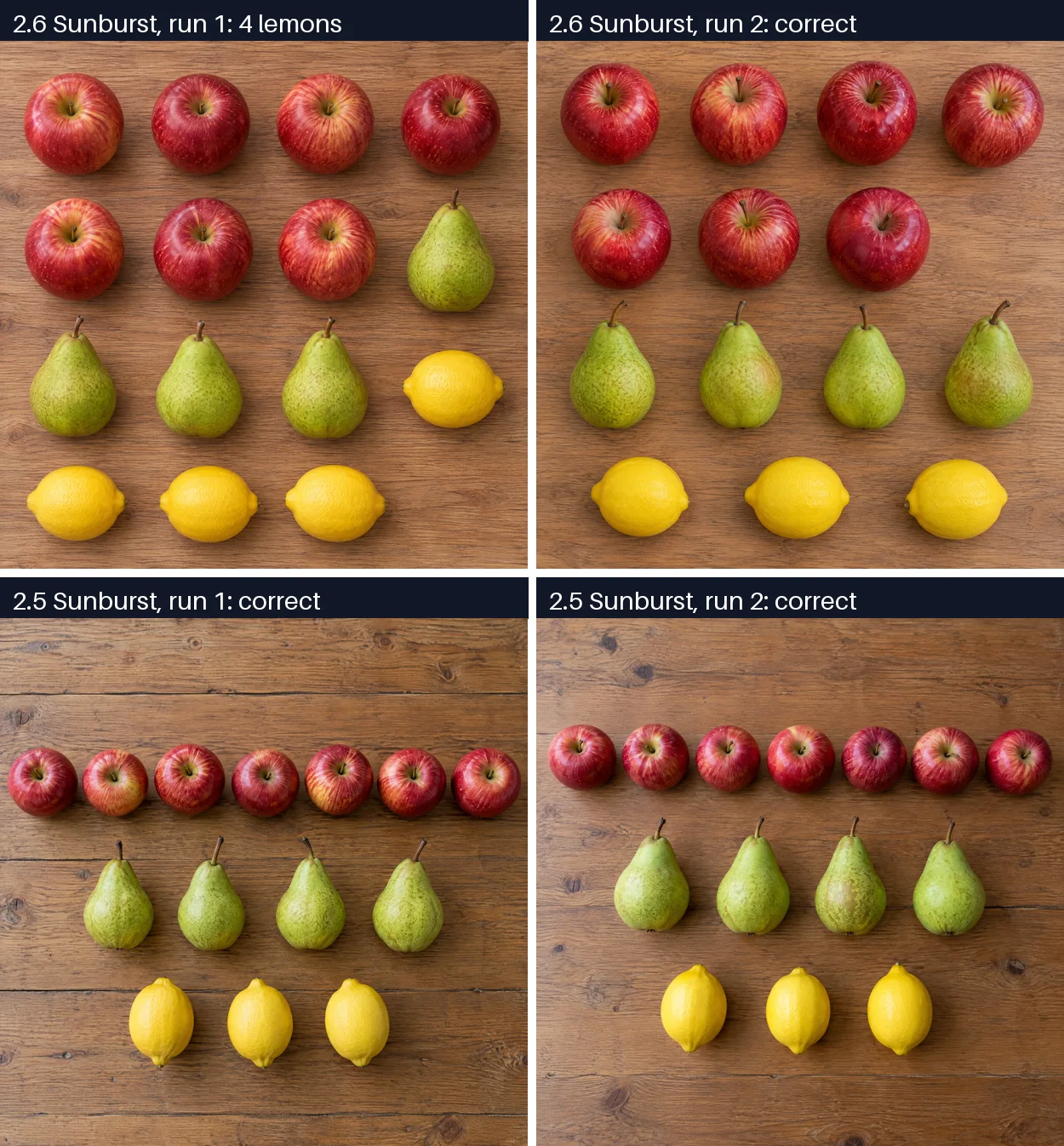
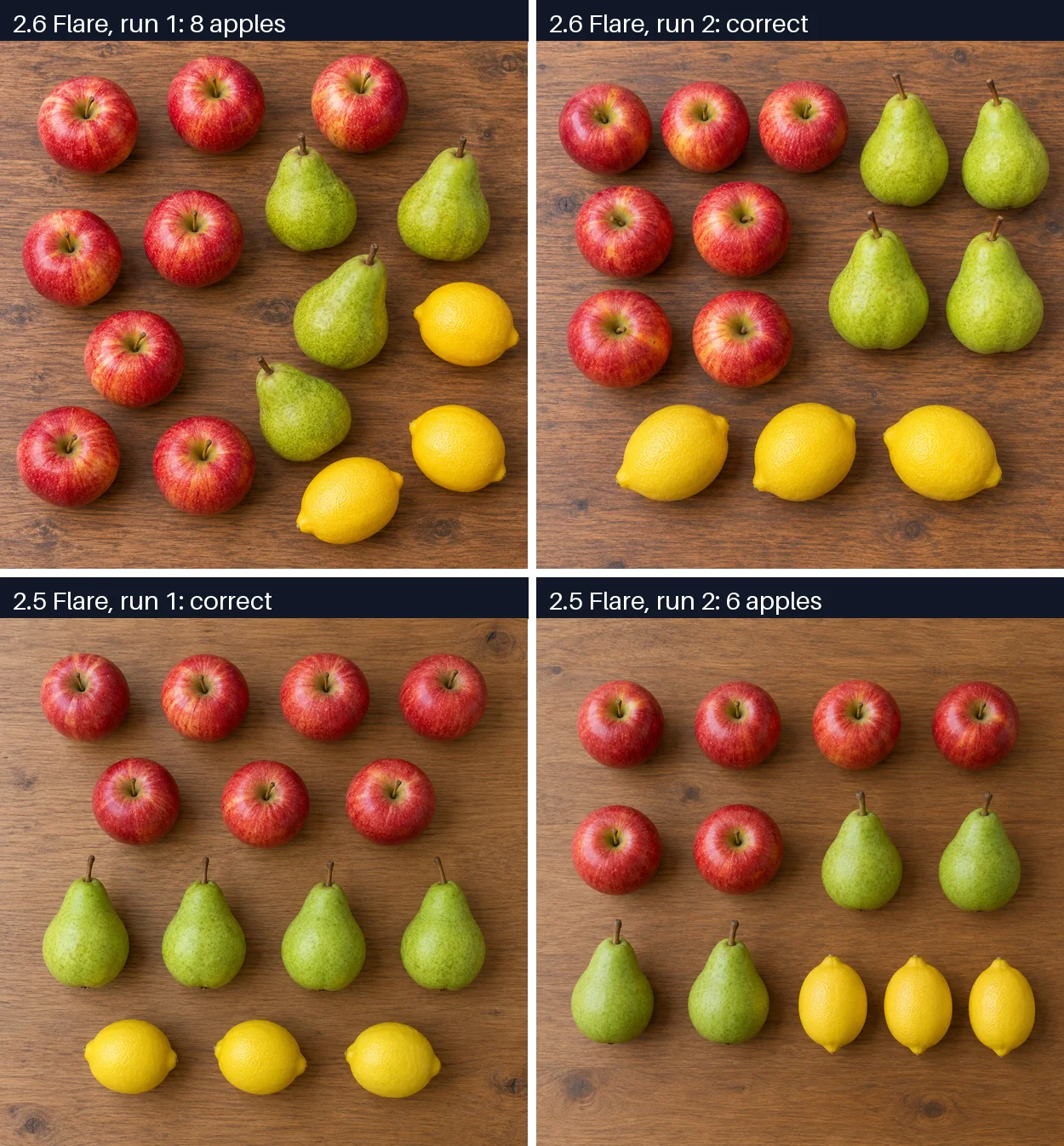
Seven apples, four pears, three lemons
Exact counts trip up image models, so we asked for them. GPT Image 2.5 Sunburst put each fruit in its own row and hit the numbers twice. Its successor slipped a fourth lemon into one run. At 1K on Flare each generation missed once: 2.6 scattered eight apples across the table, and 2.5 drew six.
Swapping a background without touching the product
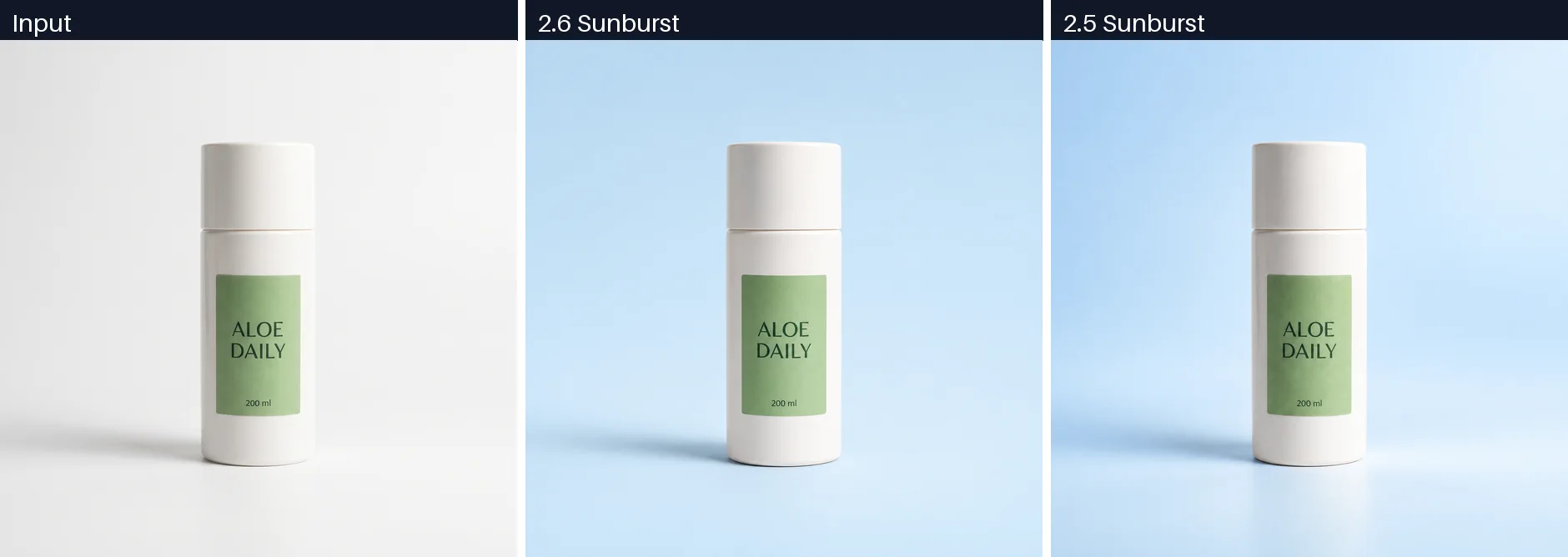
We fed both Sunburst models a 2048 x 2048 photo of a white bottle with a green "ALOE DAILY 200 ml" label and asked for a pale blue gradient behind it, with the bottle left alone. All four edits kept the label text. Measured inside the label area, 2.5 moved the pixels less (8.7 and 9.1 out of 255 on average) than 2.6 (11.6 and 11.7). OpenAI's launch post says 2.6 Sunburst holds edits more consistently at medium quality. On this one edit we measured the reverse, by a margin you only see with a ruler.
GPT Image 2.6 transparent background: both pass
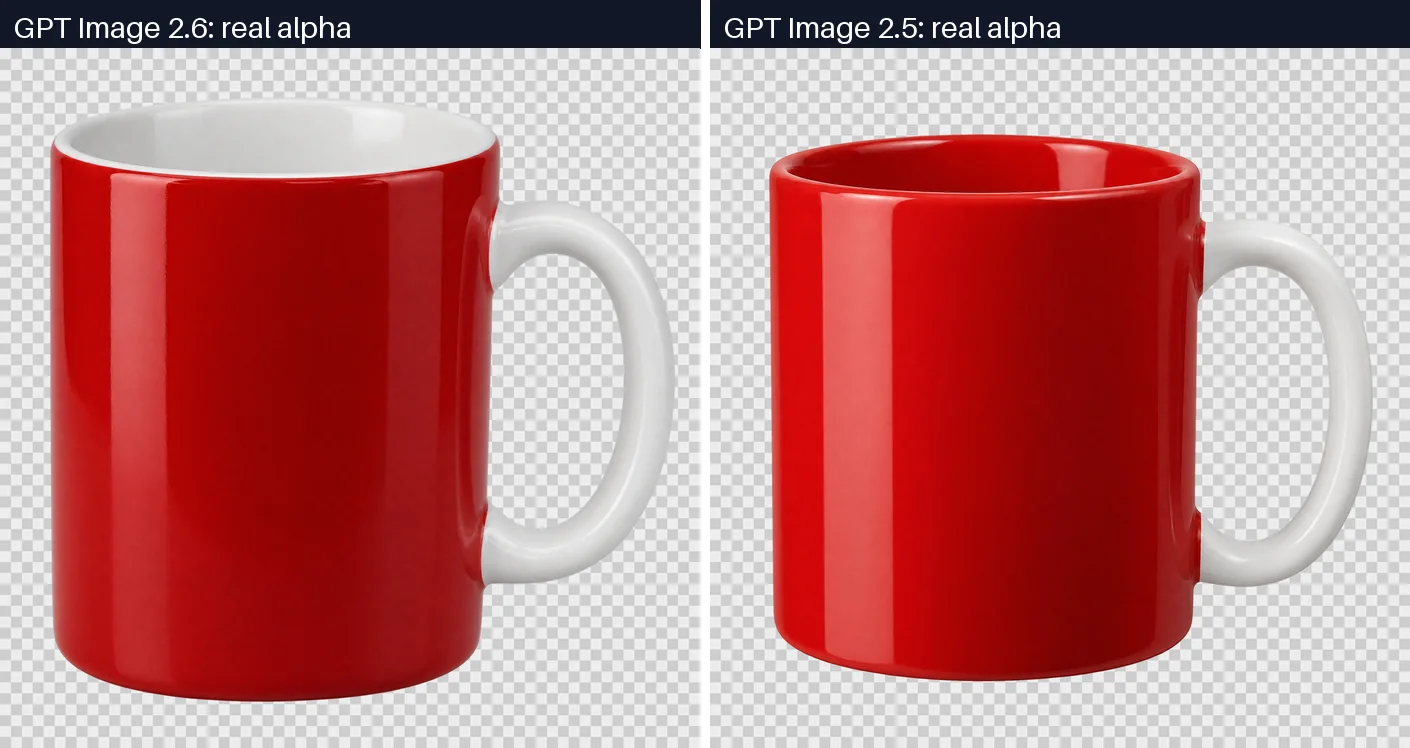
With background: "transparent" and output_format: "png", both generations returned a real RGBA file: fully clear corners, a solid subject and about 0.5% of pixels in the soft edge band. Neither faked it with a painted checkerboard. The 2.6 mug came out bigger, with a white interior.
Arena voters still rank GPT Image 2.5 above 2.6
The Arena text-to-image leaderboard dated November 12, 2026 tells the same story as our counting and edit tests.
| Arena text-to-image | Score | Votes | Status |
|---|---|---|---|
| GPT Image 2.5 Sunburst | 1429 ±5 | 63,818 | Rank 1 |
| GPT Image 2.6 Sunburst (medium) | 1406 ±13 | 2,697 | Preliminary |
| GPT Image 2.5 Flare | 1398 ±5 | 63,120 | |
| GPT Image 2.6 Flare (medium) | 1384 ±13 | 2,532 | Preliminary |
Between the two Sunburst models the confidence intervals do not touch (1424 at the bottom of 2.5's range, 1419 at the top of 2.6's), so blind voters currently prefer the older one. The Flare scores overlap. With 2.6 on about 2,600 votes against 63,000 for 2.5, its rating can still move.
Sharper detail did not translate into more votes. Our guess is that the softer 2.5 look reads as more polished at thumbnail size, which is how Arena voters see the pair.
What GPT Image 2.6 adds, and which parts UnificAlly exposes
| GPT Image 2.6 | GPT Image 2.5 | |
|---|---|---|
| Released | November 4, 2026 | September 8, 2026 |
| Model IDs on UnificAlly | openai/gpt-image-2.6-flare, openai/gpt-image-2.6-sunburst | openai/gpt-image-2.5-flare, openai/gpt-image-2.5-sunburst |
| Resolution | 1K, 2K, 4K | 1K, 2K, 4K |
| Quality values | auto, low, medium, high, xhigh, max | auto, low, medium, high, xhigh, max |
| Planning control | thinking_level (low, medium, high) | none |
| Markup edits | markup_url | none on UnificAlly (mask_url only) |
| Output formats on UnificAlly | png, jpg, webp | png, jpg, webp |
| SVG and GIF | OpenAI's own Image API only | not offered |
| OpenAI Batch API | not supported | supported |
A few of these deserve a sentence each:
- GPT Image 2.6 complexity. OpenAI calls the planning control
complexityand defaults it tohigh; on UnificAlly it isthinking_level. It changes how much the model plans the layout before drawing, and in our run it did not change the token count. - Markup edits. You draw marks on a transparent PNG laid over the first reference image and send it as
markup_url, so the model knows which region to rework without a hard mask. - GPT Image 2.6 SVG and GIF. OpenAI added vector and animated output to its own Image API. Our documentation for 2.6 lists only png, jpg and webp, so those two formats are not available through UnificAlly today.
- Speed. OpenAI says 2.6 generates images 50% faster and that Flare can finish in around six seconds. We did not time our runs, so that number stays OpenAI's.
Calling GPT Image 2.6 and 2.5 on UnificAlly
Both generations share one endpoint and one request body, so switching is a change of model ID. This is the poster request we tested, pointed at 2.6 Sunburst:
curl -X POST https://api.unifically.com/v1/tasks \
  -H "Content-Type: application/json" \
  -H "Authorization: Bearer YOUR_API_KEY" \
  -d '{
    "model": "openai/gpt-image-2.6-sunburst",
    "input": {
      "prompt": "A minimalist conference poster with the headline OPEN SOURCE SUMMIT 2026",
      "aspect_ratio": "3:4",
      "resolution": "2K",
      "quality": "medium",
      "thinking_level": "low"
    }
  }'
To run it on 2.5, change the model to openai/gpt-image-2.5-sunburst and delete thinking_level, which 2.5 does not accept. For a product edit on 2.5, add "image_urls": ["https://example.com/product.png"] and, when you want a hard boundary, a mask_url. The task comes back with an ID straight away; on our runs the finished task recorded the image URL and, for most requests, the input and output token counts. Full parameters live on the GPT Image 2.6 API page and the GPT Image 2.5 API page.
GPT Image 2.6 or 2.5 for your workload
Pick GPT Image 2.6 when:
- the image carries dense copy, such as posters, packaging or UI mockups (300 of 300 characters right in our test);
- texture sells it, as in close-ups of skin, fabric or materials (1.4x to 2x sharper on average);
- you call OpenAI directly and want SVG or GIF output.
Stay on GPT Image 2.5 when:
- you generate in volume, because the same request cost roughly a third as much;
- you edit product shots and the product must stay untouched (less pixel drift in our edit);
- layout and counts outweigh texture (3 of 4 correct counts, and first place on Arena).
Our recommendation, if you are weighing GPT Image 2.5 vs 2.6 for a live product: leave 2.5 as the default route and send only text-heavy or detail-critical jobs to 2.6, drafting those at low quality. OpenAI pitches 2.6 as faster and better. On identical requests it costs three times as much, and voters do not prefer it yet. If OpenAI trims 2.6's token use at medium quality, the first table on this page is the one that changes.
GPT Image 2.6 vs 2.5 FAQ
Is GPT Image 2.6 better than GPT Image 2.5?
Partly. In our six matched tests GPT Image 2.6 rendered finer detail and spelled dense text perfectly, while GPT Image 2.5 counted objects more reliably, disturbed a product less during an edit, cost about a third as much per image and ranked higher on the Arena text-to-image leaderboard.
Is GPT Image 2.6 more expensive than GPT Image 2.5?
Yes, per image. OpenAI bills both at the same per-token rates, but GPT Image 2.6 used about 3.3 times the output tokens in our tests: 1,450 against 440 at 1K medium quality and 2,945 against 893 at 2K. The bill rose by the same ratio on five of six prompts.
How many output tokens does GPT Image 2.6 use per image?
At medium quality, GPT Image 2.6 used 1,450 output tokens for a square 1K image and 2,945 for a square 2K image in our tests. A 3:4 poster at 2K used 1,838 and a 3:2 photo 1,519. Dropping to low quality brought the 1K image down to 825.
GPT Image 2.6 Flare vs Sunburst: what is the difference?
Flare is the faster tier and Sunburst the higher-detail tier, and both bill at the same rates on UnificAlly. On Arena, GPT Image 2.6 Sunburst scores 1406 and Flare 1384, both preliminary. They accept identical request fields, so switching between them is a change of model ID.
Can GPT Image 2.6 make SVG or GIF files?
Only through OpenAI's own Image API, where GPT Image 2.6 GIF and SVG output are generation-only formats. On UnificAlly, GPT Image 2.6 returns PNG, JPG or WebP, and the model's documentation states that SVG and GIF output are not available.
Does GPT Image 2.6 support transparent backgrounds?
Yes. With background set to transparent and output_format set to png, both GPT Image 2.6 and GPT Image 2.5 returned a real RGBA image in our test, with fully clear corners and about 0.5% of pixels in the soft edge.
Both generations are callable today through the GPT Image 2.6 API and the GPT Image 2.5 API, next to the older GPT Image 2 API. For how the earlier releases compare, see our GPT Image 1 vs 1.5 vs 2 breakdown.