Gemini Omni 1.1 Flash API pricing, 4K output, and how to access it
Gemini Omni 1.1 Flash API pricing from $0.11 per video on UnificAlly: 4-10s videos with audio, 4K output, edit costs, and how to call it.
Google released Gemini Omni 1.1 Flash on August 27, 2026, and one day later it took the #1 spot on the Arena text-to-video leaderboard. It is the production-ready update to the May Gemini Omni Flash model: same multimodal idea, a much deeper video context window, and new output options up to 4K. The 1.1 endpoints are live on UnificAlly as google/gemini-omni-flash-1.1-video and google/gemini-omni-flash-1.1-video-edit, and the old model IDs are retired.
TL;DR: Gemini Omni 1.1 Flash generates 4-10 second videos with audio, natively at 720p with 1080p and 4K upscaling inside the same task. As of August 28, 2026 it ranks #1 on Arena text-to-video (1515 Elo) and #2 on image-to-video (1488). On UnificAlly, generation costs $0.30 to $0.60 per 720p video by duration, 360p drafts cost less, 1080p upscaling costs nothing extra, 4K costs a little more, and video editing starts at $0.40. First-and-last-frame keyframes are supported. If you were on the May model, migrate today: the request body is identical, so the upgrade is a one-line model-string swap for a better-ranked model. Run Gemini Omni Flash 1.1 in the playground.
Gemini Omni 1.1 Flash: key takeaways
- Gemini Omni 1.1 Flash shipped August 27, 2026 and replaces the May 2026 Gemini Omni Flash; the old
google/gemini-omni-flash-videoAPI IDs no longer accept new tasks. - One day after release it holds #1 on Arena text-to-video at 1515 Elo and #2 on image-to-video at 1488 Elo (August 28, 2026).
- The model now reads up to 10 seconds of prior video context, up from 1 second in May, so characters, lighting, and scene layout stay consistent across edits.
- Output is 4, 6, 8, or 10 seconds at 360p or 720p native; requesting 1080p or 4k upscales in the same task with no separate call. Start and end frame keyframes are supported for controlled transitions.
- On UnificAlly, generation costs $0.30 (4s), $0.40 (6s), $0.50 (8s), or $0.60 (10s) per video at 720p or 1080p; 360p drafts cost less and 4K a little more. The edit endpoint (one source video up to 30 seconds and 1GB) costs $0.40 to $1.20 by resolution.
- Google's scene extension to a cumulative 40 seconds and short video references have not reached the UnificAlly endpoints yet.
What is Gemini Omni 1.1 Flash?
Gemini Omni 1.1 Flash is Google's multimodal video model. Text, images, video, and audio all sit in the model context, and the output is high-resolution video with audio in one file. Google writes the name as Gemini Omni 1.1 Flash; the UnificAlly model page uses Gemini Omni Flash 1.1. Same model.
The pitch has not changed since May: media is context. A product still, a character reference, a voice preset, and a written prompt can all steer one generation, and a follow-up instruction builds on the previous result. What changed is how much the model remembers.
What's new in 1.1
The May model referenced only the final second of prior video when building on earlier context. 1.1 reads up to 10 seconds. In practice that is the difference between an edit loop that drifts (a character's face slowly changing across three edits) and one that holds together.
Google's launch post also introduced four capabilities on its own stack:
| Capability | What it does | On UnificAlly endpoints? |
|---|---|---|
| First/last keyframes | Generate continuous video between two frames | Yes (start_image_url + end_image_url) |
| 360p drafts | Fast previews for iteration | Yes, below the 720p price |
| 4K upscale | 1080p or 4K output from a 720p generation | Yes, in-task |
| Scene extension | Continue a video in 10-second steps up to 40 seconds cumulative | Not yet |
The honest read: nearly all of the launch surface is callable here today. Keyframes take a start and end image for controlled transitions, and 360p drafts cut the iteration bill (a 360p video can only be upscaled to 720p later, so keep finals at 720p or above). The one gap is the 40-second scene extension, which has not reached this API surface; it is named in What to watch next and we will update this post when it lands.
Gemini Omni 1.1 Flash API pricing
UnificAlly bills per generated video, priced by duration and resolution. 1080p costs the same as 720p: a 10-second video costs $0.60 at either, so the in-task 1080p upscale is effectively free. 4K costs a little more ($1.03 for 10 seconds), and 360p drafts cost less than 720p. These are our current rates, refreshed from the live price list on every deploy:
| Model | Option | Our rate |
|---|---|---|
| Gemini Omni Flash 1.1 Video | duration: 4 with 360p | $0.11 |
| duration: 6 with 360p | $0.17 | |
| duration: 8 with 360p | $0.23 | |
| duration: 10 with 360p | $0.28 | |
| duration: 4 with 720p | $0.30 | |
| duration: 4 with 1080p | $0.30 | |
| duration: 6 with 720p | $0.40 | |
| duration: 6 with 1080p | $0.40 | |
| duration: 8 with 720p | $0.50 | |
| duration: 8 with 1080p | $0.50 | |
| duration: 10 with 720p | $0.60 | |
| duration: 10 with 1080p | $0.60 | |
| duration: 4 with 4k | $0.72 | |
| duration: 6 with 4k | $0.82 | |
| duration: 8 with 4k | $0.92 | |
| duration: 10 with 4k | $1.03 | |
| Gemini Omni Flash 1.1 Video Edit | 360p | $0.40 |
| 720p | $0.80 | |
| 1080p | $0.80 | |
| 4k | $1.20 |
Draft at 360p while you iterate on a prompt, then rerun the winner at 720p or 4k; a 360p output can only be upscaled to 720p later, so it is an iteration tool, not a cheap path to finals.
Billing is pay-per-use with no subscription, and balance does not expire. For a cheaper Google video path when you do not need references or editing, Veo 3.1 starts at $0.075 per video for Lite Relaxed; the full head-to-head is in Gemini Omni 1.1 Flash vs Veo 3.1.
How to access the Gemini Omni 1.1 Flash API
POST to /v1/tasks with the model ID and your input. The same body that worked on the May model works here.
curl -X POST https://api.unifically.com/v1/tasks \
  -H "Content-Type: application/json" \
  -H "Authorization: Bearer YOUR_API_KEY" \
  -d '{
    "model": "google/gemini-omni-flash-1.1-video",
    "input": {
      "prompt": "Make @Character1 dance in a neon studio with energetic camera movement.",
      "reference_characters": [
        {
          "image_urls": ["CHARACTER_IMAGE_URL"],
          "name": "Dancer"
        }
      ],
      "duration": 10,
      "aspect_ratio": "9:16",
      "resolution": "1080p"
    }
  }'
Submission returns a task_id; poll GET /v1/tasks/<task_id> or set a callback_url. Generation mode takes a prompt plus optionally a start image, up to 7 reference images, up to 3 named character references, a Google voice preset, and a seed. Edit mode takes exactly one source video (up to 30 seconds, 1GB) plus an edit prompt, with optional per-character voices. Full parameters live on the model page, which also has a browser playground if you want to try prompts before writing code.
Benchmarks: #1 on Arena text-to-video
Arena rankings as of August 28, 2026, one day after release:
| Board | Rank | Elo | Votes | Notable neighbors |
|---|---|---|---|---|
| Text-to-video | #1 | 1515 | 1,762 | Gemini Omni Flash (May) #2 at 1512, FLUX 3 Video #3 at 1495 |
| Image-to-video | #2 | 1488 | 3,720 | MiniMax Hailuo H3 #1 at 1494, SeeDance 2.5 #3 at 1483 |
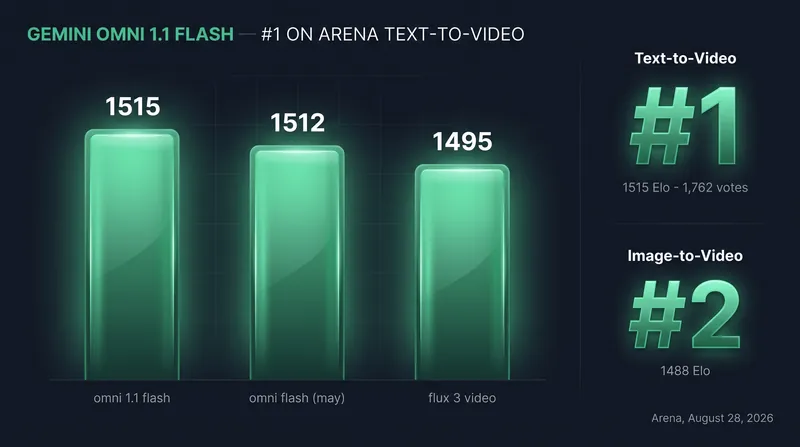
Two caveats worth stating. The vote counts are one day old, and preliminary ratings move: the rank confidence interval on text-to-video is 1-3, so #1 could settle to #3 as votes accumulate. And on image-to-video the model has not taken the top spot; MiniMax Hailuo H3 still holds it. Where the gain is unambiguous is against its own predecessor: the May model sits at #5 on image-to-video with 1463 Elo, a 25-point gap that shows up exactly where the 10-second context window should help, when an input image has to carry through the whole video.
Migrating from Gemini Omni Flash
The old IDs (google/gemini-omni-flash-video, google/gemini-omni-flash-video-edit) are retired and no longer accept new tasks. The 1.1 endpoints accept the same request body: prompt, references, characters, voice, aspect_ratio, duration, resolution, seed. Migration is one line:
-    "model": "google/gemini-omni-flash-video",
+    "model": "google/gemini-omni-flash-1.1-video",
There is no parameter renaming and no behavior change to code around. This is the cheapest model upgrade you will do this year, and the Arena numbers say it is a real one.
Why this matters for builders
If you run the May model in production: migrate now. Your requests keep working, the model ranks higher on both boards, and the retired IDs will not take new tasks anyway.
If you are choosing a video API this month: Omni 1.1's case is references and editing. Up to 7 reference images and 3 named characters steer a generation, and the edit endpoint rewrites an existing video from one instruction. No other Google video endpoint does that; Veo 3.1 is the better pick when you need first-and-last-frame control or the cheapest possible drafts.
If you were waiting for long-form generation: not yet. The 40-second scene extension exists on Google's stack, not on these endpoints. Budget your work around 4-10 second results today.
Our take: the 10-second context window is the feature that matters, more than the leaderboard rank. Video APIs have been stateless one-shot generators; a model that actually remembers the last 10 seconds turns the edit loop into something you can build a product on. Keyframes and cheaper 360p drafts landing on the API in the same week make the workflow story complete. What still deserves a caveat: 4K is an upscale of a 720p render rather than a native 4K generation, and the 40-second scenes from the launch video cannot be built here yet. Migrate for the consistency, not for the marketing.
What to watch next for Gemini Omni 1.1 Flash
- Scene extension and short video references appearing on the UnificAlly endpoints. Keyframes and 360p drafts already landed on launch day; extension is the remaining gap, and we will update this post when it arrives.
- The Arena video-edit board listing
gemini-omni-1.1-flash. The May model held #4 there; 1.1 is not listed yet as of August 28, 2026. - The text-to-video rank settling as votes accumulate past the launch window (current rank CI is 1-3).
Gemini Omni 1.1 Flash FAQ
How much does the Gemini Omni 1.1 Flash API cost?
On UnificAlly, a Gemini Omni 1.1 Flash generation costs $0.30 to $0.60 per 720p video depending on duration (4 to 10 seconds), 360p drafts cost less, and a video edit costs $0.40 to $1.20 by resolution, billed pay-per-use with no subscription. Requesting 1080p output upscales inside the same task at no extra cost; 4K costs a little more.
Is Gemini Omni 1.1 Flash available via API?
Yes. Google offers it through Google AI Studio and the Gemini Enterprise Agent Platform, and on UnificAlly it runs as google/gemini-omni-flash-1.1-video (generation) and google/gemini-omni-flash-1.1-video-edit (editing) with a browser playground on the Gemini Omni Flash 1.1 API page.
What happened to the old Gemini Omni Flash API?
The May 2026 model IDs are retired and no longer accept new tasks. The 1.1 endpoints take the same request body, so migrating is a one-line change to the model string.
Does Gemini Omni 1.1 Flash generate 4K video?
Yes, by upscaling. Generation renders natively at 720p; requesting 1080p or 4k upscales the result inside the same task, so there is no separate upscale call to manage. Output is not natively rendered at 4K.
Can Gemini Omni 1.1 Flash make videos longer than 10 seconds?
Not through the UnificAlly endpoints today. Google's own stack supports extending scenes in 10-second steps to a cumulative 40 seconds, and we will add scene extension when it reaches these endpoints. The edit endpoint does accept source videos up to 30 seconds.
Is Gemini Omni 1.1 Flash better than Veo 3.1?
On Arena leaderboards, clearly: it leads Veo 3.1's best row by about 150 Elo on text-to-video (August 28, 2026). Veo 3.1 still wins on first-and-last-frame control, the Extend endpoint, and draft price. The full comparison is in Gemini Omni 1.1 Flash vs Veo 3.1.
Related reading on Gemini Omni 1.1 Flash
- Gemini Omni Flash 1.1 model page: playground, full parameters, and example generations.
- Gemini Omni 1.1 Flash vs Veo 3.1: pricing, benchmarks, and which Google video API to use.
- Veo 3.1 API pricing: Google's other video model, from $0.075 per video.
- Imagen 4 API shutdown: how Google is consolidating its media APIs around Gemini-branded models.
We will update this post when the scene-extension and keyframe features reach the API, and re-check Arena ranks on every edit.