Gemini Omni 1.1 Flash API pricing, 4K output, and how to access it
Gemini Omni 1.1 Flash, released Aug 27, 2026: 4-10s video with audio from $0.11, #2 on Arena text-to-video behind 1.2. Pricing, 4K output, how to call it.
Gemini Omni 1.1 Flash is the Google video model released on August 27, 2026. It makes 4, 6, 8 or 10 second videos with sound, and on UnificAlly a 4-second video costs $0.11 at 360p or $0.30 at 720p or 1080p. Ten weeks later it already has a successor: Google released Gemini Omni 1.2 Flash on November 5, 2026, and on December 3 Google's own API starts sending every 1.1 call to 1.2.
TL;DR: The Gemini Omni Flash 1.1 API still takes new tasks on UnificAlly as
google/gemini-omni-flash-1.1-videoandgoogle/gemini-omni-flash-1.1-video-edit, billed per finished video by length and resolution: $0.30 to $0.60 at 720p, with 1080p on the same line. On the Arena board dated November 7, 2026 it ranks #2 for text-to-video (1513) behind 1.2, and #4 for image-to-video (1487). Our advice: start new work on Gemini Omni Flash 1.2, which takes the same request body, and keep 1.1 only for fixed 8 to 10 second 1080p deliverables while it lasts.
Gemini Omni 1.1 Flash in five facts, before the December 3 switch
- Google is retiring it on its own API. The Gemini API deprecations table lists
gemini-omni-1.1-flashwith a shutdown date of December 3, 2026; calls after that run on 1.2 and are billed at 1.2 rates (Google deprecations). - It is no longer the top Omni on Arena. Gemini Omni 1.2 Flash leads text-to-video at 1540 on a preliminary rating, 27 points above 1.1 at 1513.
- Every UnificAlly 1.1 video is billed as a whole video. A 7-second idea pays for 8 seconds, because duration only takes 4, 6, 8 or 10.
- 1080p is priced like 720p on 1.1. The billing line reads "720p/1080p", so the in-task upscale to 1080p adds nothing to the bill. 1.2 prices 1080p on its own line.
- Scene extension never reached the 1.1 endpoints here. It was the headline of Google's 1.1 launch. On UnificAlly it arrived only with the 1.2 extend model.
When Gemini Omni 1.1 Flash was released, and how long it stays
Google announced Gemini Omni 1.1 Flash on August 27, 2026 as the update that would make Omni usable for production work (Google's launch post). It replaced the first Gemini Omni Flash, which Google showed at I/O on May 19, 2026. Google writes the name as Gemini Omni 1.1 Flash. Our model page orders it Gemini Omni Flash 1.1, and the API IDs follow that order. Same model.
The lifespan turned out short. Gemini Omni 1.2 Flash went out on November 5, 2026 as the first Omni release Google marks generally available, and Google's AI Studio docs now describe 1.1 as the previous generation. Where you call it decides what happens next:
| Surface | Model ID | Status on November 16, 2026 |
|---|---|---|
| Gemini API / AI Studio | gemini-omni-1.1-flash | Calls route to gemini-omni-1.2-flash from December 3, 2026, billed at 1.2 rates |
| Vertex AI (Gemini Enterprise Agent Platform) | gemini-omni-1.1-flash-preview | Preview; Interactions API only; Provisioned Throughput or fixed quota, no pay-as-you-go; global region only |
| UnificAlly | google/gemini-omni-flash-1.1-video, google/gemini-omni-flash-1.1-video-edit | Live and taking new tasks; 1.2 is live beside it with the same body |
The Vertex row surprised us. Google's Vertex model card lists pay-as-you-go as "Not supported", so a small team on Google Cloud has to buy throughput up front to call 1.1 at all. Our own 1.2 page already tells customers that 1.1 is on its way out. We have not announced a date for the UnificAlly 1.1 endpoints, so we will not guess one here.
Gemini Omni 1.1 Flash pricing: one price per finished video
Gemini Omni API pricing for 1.1 on UnificAlly has two inputs, length and resolution, and nothing else. A failed task is not billed. These are the live rates for both endpoints:
| Model | Option | Our rate |
|---|---|---|
| Gemini Omni Flash 1.1 Video | 360p · 4s | $0.11 |
| 360p · 6s | $0.17 | |
| 360p · 8s | $0.23 | |
| 360p · 10s | $0.28 | |
| 720p/1080p · 4s | $0.30 | |
| 720p/1080p · 6s | $0.40 | |
| 720p/1080p · 8s | $0.50 | |
| 720p/1080p · 10s | $0.60 | |
| 4k · 4s | $0.72 | |
| 4k · 6s | $0.82 | |
| 4k · 8s | $0.92 | |
| 4k · 10s | $1.03 | |
| Gemini Omni Flash 1.1 Video Edit | 360p | $0.40 |
| 720p | $0.80 | |
| 1080p | $0.80 | |
| 4k | $1.20 |
Three things in that table decide most bills:
- 360p is the draft tier. An 8-second 360p video costs $0.23 against $0.50 at 720p. Google says 360p also generates up to 60% faster than 720p on its side.
- 1080p shares the 720p line. Ask for
"resolution": "1080p"and the task generates at 720p, upscales, and bills the 720p rate. - 4K is the only upscale with its own price. A 10-second 4K video is $1.03.
The edit endpoint ignores length within its 30-second source limit and bills by output resolution: $0.40 at 360p, $0.80 at 720p, $0.80 at 1080p and $1.20 at 4K.
A Gemini Omni cost estimate for one 8-second ad
Say you need one 8-second vertical ad and expect to throw away five drafts before the keeper. On 1.1 the run costs five 360p drafts at $1.15 in total, plus the final 720p generation at $0.50. Delivering at 1080p instead changes nothing on that last line.
There is a cheaper finish if the best draft already looks right. Send its task_id to google/veo-3.1-upscale with "resolution": "720p", which costs $0.05 and works only for 360p Omni 1.1 sources. A 360p video can go up to 720p and no higher, and an upscale cannot invent detail the draft never had. We would use that route for social posts and regenerate at 720p for anything with faces or text on screen.
That loop is the cheap Gemini Omni API path on 1.1. On 1.2 the same five drafts cost $0.76 (40 billed seconds) and the 720p final $0.3424.
Gemini Omni price per video: 1.1 against 1.2
Gemini Omni pricing splits by version, so the Gemini Omni price you pay depends on which model string the request carries. 1.1 charges per finished video at four fixed lengths. 1.2 charges per second, for any whole number of seconds from 3 to 15, with slightly different per-second rates at the very short and very long ends. Same request body, different bill:
| Video | Gemini Omni 1.1 Flash | Gemini Omni 1.2 Flash |
|---|---|---|
| 4 s at 360p | $0.11 | $0.076 |
| 8 s at 360p | $0.23 | $0.152 |
| 4 s at 720p | $0.30 | $0.1712 |
| 7 s at 720p | billed as 8 s: $0.50 | $0.2996 |
| 10 s at 720p | $0.60 | $0.428 |
| 10 s at 1080p | $0.60 | $0.475 |
| 10 s at 4K | $1.03 | current rate |
| 15 s at 720p | not available | $0.642 |
Gemini Omni Flash pricing differs most between the two versions in the 1080p row: 1.1 bills a 1080p video on its 720p line, while 1.2 prices 1080p per second on a line of its own. Odd lengths go the other way. A 1.1 request for 5 or 7 seconds pays for the next length up, while 1.2 bills exactly the seconds you asked for.
Gemini Omni 1.1 Flash's 10-second context is an extension feature
The first version of this post sold the 10-second context as a general memory upgrade for edit loops. Read Google's launch post closely and it sits in the scene-extension section: when 1.1 continues a video, it looks at up to 10 seconds of what came before, where the May model looked at the last second only. Google promised extension in 10-second steps up to 40 seconds in total.
Here is what Google listed at launch against what the UnificAlly 1.1 endpoints accept:
| Launch feature | On the UnificAlly 1.1 endpoints |
|---|---|
| First and last frame | Yes: start_image_url plus end_image_url |
| 360p drafts | Yes: "resolution": "360p" |
| 1080p and 4K upscale | Yes, inside the same task |
| Scene extension with 10 s of context | No. Extension exists only as google/gemini-omni-flash-1.2-video-extend |
| Video references of up to 3 s in generation | No |
Google has also moved the goalposts since. Its current Omni docs cap extension at 30 seconds in total, adding 3 to 10 seconds per turn with the last 10 seconds as context, and that applies to 1.2. If continuing a video is the reason you looked at Omni, the 1.1 endpoints are the wrong ones to build on.
Calling the Gemini Omni 1.1 Flash API, and the requests it rejects
Every Omni 1.1 task is one POST to /v1/tasks. This request makes a 10-second vertical video of a named character at 1080p, billed on the 720p line:
curl -X POST https://api.unifically.com/v1/tasks \
  -H "Content-Type: application/json" \
  -H "Authorization: Bearer YOUR_API_KEY" \
  -d '{
    "model": "google/gemini-omni-flash-1.1-video",
    "input": {
      "prompt": "Make @Character1 dance in a neon studio with energetic camera movement.",
      "reference_characters": [
        {
          "image_urls": ["CHARACTER_IMAGE_URL"],
          "name": "Dancer"
        }
      ],
      "duration": 10,
      "aspect_ratio": "9:16",
      "resolution": "1080p"
    }
  }'
The answer comes back at once with a task ID and "status": "processing":
{
  "code": 200,
  "success": true,
  "data": {
    "task_id": "abc123def456",
    "status": "processing"
  }
}
Read GET /v1/tasks/<task_id> until the video is ready, or put a callback_url on the request. Only prompt is required. The defaults are 4 seconds, 16:9 and 720p, and the Omni 1.1 docs page lists every field.
The generate endpoint turns these requests away before any generation starts:
end_image_urlwithoutstart_image_url.- Frame fields mixed with
reference_image_urlsorreference_charactersin one request. - More than 7 image URLs once character images are counted with the reference images.
- More than 3 characters, or more than 10
image_urlson one character. - A character written as a plain string, or with the singular
image_url. - A
voicepreset with no image or character reference attached.
Two inputs are easy to miss. allow_audio_filtered: true returns a silent video when Google filters the sound, instead of a failed task. nsfw_check: true screens the prompt and images before anything is generated.
Editing runs on its own ID, google/gemini-omni-flash-1.1-video-edit. It takes exactly one source video in reference_video_urls (up to 30 seconds and 1 GB), called @Video1 in the prompt. start_frame and end_frame pick the range to change. Leave out aspect_ratio and a portrait source comes back 9:16, anything else 16:9. Characters in an edit can each carry their own voice preset or a tuned custom_voice.
Moving Gemini Omni 1.1 Flash requests to 1.2
The 1.2 endpoints accept the 1.1 body unchanged, so moving over is a one-line change:
-    "model": "google/gemini-omni-flash-1.1-video",
+    "model": "google/gemini-omni-flash-1.2-video",
What you gain, field by field (1.2 docs):
| Field | Omni 1.1 Flash | Omni 1.2 Flash |
|---|---|---|
duration | 4, 6, 8 or 10 | Any whole second from 3 to 15; 10 at most in frame mode |
aspect_ratio | 16:9, 9:16 | Adds auto, which follows the first image |
voice | One preset | One preset or a list of up to 5 |
seed | Integer | 0 to 2147483647 |
| Extend | None | google/gemini-omni-flash-1.2-video-extend, 3 to 10 s per call |
| Edit window | Source up to 30 s | Up to 15 s changed per edit |
The extend model has rules of its own. It needs a finished 1.2 video made at 360p or 720p, it refuses videos made with character references, and it bills only the new seconds. A pipeline that leans on named characters and extension together should test that combination before it moves.
Gemini Omni 1.1 Flash Arena ranks on the November 7 board
We pulled these from Arena on November 16, 2026. The text-to-video and image-to-video boards are dated November 7, the video-edit board November 10:
| Board | Gemini Omni 1.1 Flash | Gemini Omni 1.2 Flash | Original Gemini Omni Flash |
|---|---|---|---|
| Text-to-video | #2, 1513 ±15, 1,792 votes | #1, 1540 ±16, 1,714 votes (preliminary) | #3, 1509 ±8, 46,707 votes |
| Image-to-video | #4, 1487 ±11, 3,725 votes | #1, 1503 ±12, 2,666 votes (preliminary) | #8, 1463 ±6, 136,190 votes |
| Video edit | Not listed | #3, 1396 ±16 (preliminary) | #4, 1380 ±12 |
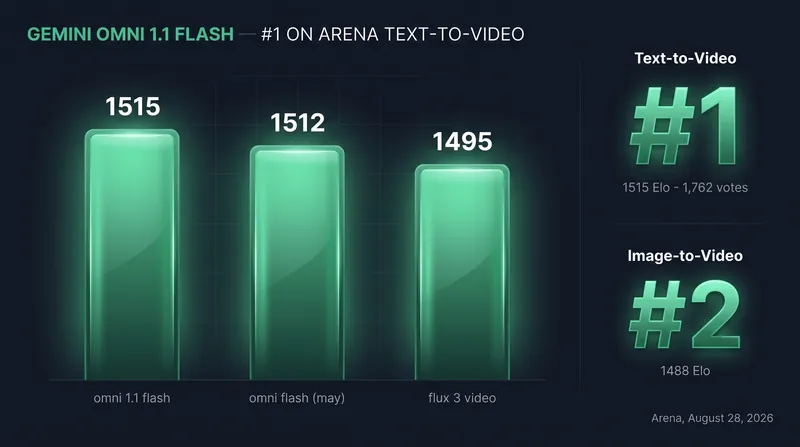
The card above shows launch week, when 1.1 held #1 on text-to-video. On the Gemini Omni 1.1 Flash Arena numbers from November 7, 1.1 sits only 4 points above the original Omni on text-to-video, inside both error bars, so the version bump barely shows when there is no input image. Image-to-video tells a different story: 24 points over the original, and close behind Seedance 2.5 (1494) and MiniMax Hailuo H3 (1493). 1.2's lead rests on fewer than 3,000 votes per board and is still marked preliminary. 1.1 has never appeared on the video-edit board, so nobody has a public preference number for its edit endpoint.
Who should still send work to Gemini Omni 1.1 Flash
We would put almost nothing new on 1.1. Google retires it on its own API on December 3, 1.2 leads it on both Arena boards, and the body is identical. A move now costs one line; a move forced later costs a rushed regression pass.
Two cases still favor 1.1 for the next few weeks:
- Fixed 8 or 10 second deliverables at 1080p. Compare $0.60 with $0.475 for ten seconds at 1080p.
- Edits of a long source video. The 1.1 edit endpoint accepts a 30-second source and bills one flat rate per output resolution, while 1.2 bills each edited second.
Everything else, odd lengths, 15-second scenes, continuing a video, goes to 1.2. For the cheapest Google video drafts of all, Veo 3.1 on its Lite Relaxed tier starts at $0.075 per video; Gemini Omni 1.1 Flash vs Veo 3.1 goes through that trade tier by tier.
Gemini Omni 1.1 Flash FAQ
How much does the Gemini Omni 1.1 Flash API cost?
On UnificAlly a Gemini Omni 1.1 Flash video costs $0.30 to $0.60 at 720p or 1080p, by length. 360p drafts start at $0.11, 4K at $0.72, and an edit costs $0.40 to $1.20.
Billing is per finished video, with no subscription, and a failed task costs nothing.
When was Gemini Omni 1.1 Flash released?
Google released Gemini Omni 1.1 Flash on August 27, 2026, about three months after the first Gemini Omni Flash appeared at Google I/O on May 19. Its successor, Gemini Omni 1.2 Flash, followed on November 5, 2026, and Google's API routes 1.1 calls to 1.2 from December 3.
Is Gemini Omni 1.1 Flash available via API?
Yes. On UnificAlly it runs as google/gemini-omni-flash-1.1-video and google/gemini-omni-flash-1.1-video-edit. Google serves it as gemini-omni-1.1-flash in AI Studio until December 3, 2026, and as a Vertex AI preview that needs Provisioned Throughput or fixed quota.
The Gemini Omni Flash 1.1 API page has a browser playground for testing prompts before you write code.
What happened to the old Gemini Omni Flash API?
The May 2026 Gemini Omni Flash is retired. Google shut down gemini-omni-flash-preview on its API on October 22, 2026, and the UnificAlly IDs google/gemini-omni-flash-video and -video-edit no longer take new tasks. The 1.1 and 1.2 endpoints accept the same request body.
Does Gemini Omni 1.1 Flash generate 4K video?
Yes, by upscaling. Gemini Omni 1.1 Flash generates at 360p or 720p, and a request for 1080p or 4k upscales the 720p result inside the same task, so there is no second call. On UnificAlly 1080p costs the 720p rate and 4K has its own rate.
Can Gemini Omni 1.1 Flash make videos longer than 10 seconds?
No. Gemini Omni 1.1 Flash tops out at 10 seconds per video, and its UnificAlly endpoints have no extension. Gemini Omni 1.2 Flash generates up to 15 seconds in one task, and its extend model adds 3 to 10 seconds per call to a finished 1.2 video.
The 1.1 edit endpoint does accept a source video of up to 30 seconds.
Is Gemini Omni 1.1 Flash better than Veo 3.1?
On blind preference, yes. On the Arena boards dated November 7, 2026, Gemini Omni 1.1 Flash scores 1513 on text-to-video against 1363 for the best Veo 3.1 row, and 1487 against 1399 on image-to-video. Veo 3.1 keeps its Extend endpoint and the cheapest draft tier.
The tier-by-tier comparison is in Gemini Omni 1.1 Flash vs Veo 3.1.
Related reading on Gemini Omni 1.1 Flash
- Gemini Omni Flash 1.1 API and Gemini Omni Flash 1.2 API: playgrounds, full parameter tables and example videos.
- Gemini Omni 1.1 Flash vs Veo 3.1: which Google video model to pick at each Veo tier.
- Veo 3.1 API pricing: every Veo tier, Extend and Upscale, from $0.075 per video.
- Imagen 4 API shutdown: an earlier case of Google retiring a media model on a short schedule.