Wan 2.2 Animate: Specs, How to Run It, and API Access
Wan 2.2 Animate is Alibaba's Apache-2.0 character animation model. Both modes, specs, how to run it, and the closest live API.
Wan 2.2 Animate is Alibaba's open-source character animation model, released by the Wan team on September 19, 2025. Give it one character image and one source video, and it does one of two things: animates the character with the video's motion and facial expressions, or swaps the character into the video itself. The weights sit on Hugging Face and ModelScope under Apache 2.0, so running it costs nothing but GPU time. There is no Wan 2.2 Animate route on UnificAlly today. This post covers what the model does, every official way to run it, and the closest motion-transfer API you can call right now.
TL;DR: Wan 2.2 Animate (
Wan2.2-Animate-14B) is a 14B open-weight model with two modes: animation (a character image performs the motion and expressions from a source video) and replacement (the character is swapped into the source video, with a relighting LoRA to match the scene's light). Apache 2.0 license, 480p or 720p output. Run it through the open weights, a ComfyUI workflow, the official Hugging Face Space, or Alibaba Cloud Model Studio. It is not callable on UnificAlly; the closest live route is Kling Motion Control 3.0, and the served Wan 2.2 route covers text-to-video and image-to-video at $0.20 per video.
What is Wan 2.2 Animate?
Wan 2.2 Animate is a unified model for character animation and character replacement, built on the Wan image-to-video architecture. Two inputs drive everything: a character image and a source video of a real performer. Body movement is copied through spatially aligned skeleton signals extracted from the video, and facial expressions are copied through implicit features pulled from the performer's face. That second part is what separates it from plain pose-transfer models: eye direction, mouth shape, and micro-expressions carry over, not only the skeleton.
| Spec | Value |
|---|---|
| Model | Wan2.2-Animate-14B |
| Release date | September 19, 2025 |
| Parameters | 14B |
| License | Apache 2.0 (weights and generated output) |
| Output resolution | 480p or 720p |
| Inputs | 1 character image + 1 source video |
| Modes | Animation, replacement |
| Weights | Hugging Face (Wan-AI), ModelScope |
Animation mode
The model generates a new video of your character image performing the motion in the source video. Record a dance on a phone, feed it in with a single illustration, and the illustration performs the dance. The output scene comes from the character image.
Replacement mode
The model swaps your character into the source video, keeping the original scene, camera, and motion. An optional relighting LoRA adjusts the inserted character's lighting and color tone to match the environment, which is the difference between a composite that reads as real and one that reads as a sticker. This is the mode behind most "wan 2.2 animate character swap" results you see on social feeds.
How to run Wan 2.2 Animate (official options)
Four official paths, from most control to least setup.
Download the open weights
The full checkpoint is a free download from Hugging Face (Wan-AI/Wan2.2-Animate-14B) or ModelScope, with inference code in the Wan-Video/Wan2.2 GitHub repo. Generation is a two-step job: a preprocessing pass first extracts pose and face data from your source video, then the main call renders:
python generate.py --task animate-14B --ckpt_dir ./Wan2.2-Animate-14B/
Replacement mode adds --use_relighting_lora for the environment-matching pass. The repo's reference commands run at 1280x720, and multi-GPU inference uses FSDP with DeepSpeed Ulysses across 8 GPUs. This is the cheapest path at volume and the only one with full parameter control, but you are operating a 14B video model yourself.
Run it in a ComfyUI workflow
ComfyUI supports Wan 2.2 Animate natively, and the official docs include a template workflow covering both modes (Move for animation, Mix for replacement). If you already have a ComfyUI box for Wan 2.2 image-to-video, this is the shortest path from download to first output.
Try the Hugging Face Space
The repo links an official Space and a ModelScope Studio for browser testing. The Space is not what it was at launch; the next section covers where it stands and what to use instead. Searches for "wan 2.2 animate hugging space" land here.
Call Alibaba Cloud Model Studio
Alibaba's own hosted API serves the model as two IDs: wan2.2-animate-move (animation) and wan2.2-animate-mix (replacement), each with wan-std and wan-pro quality modes. The API is asynchronous: create a task, poll for the result. Input rules are strict and worth knowing before you build against it: the source video must be 2 to 30 seconds, 200 to 2048 pixels per side, up to 200 MB; the character image up to 5 MB at 200 to 4096 pixels per side. Note that China (Beijing) and Singapore regions use separate API keys and endpoints. Alibaba also runs wan.video, the Wan family's own web app.
Where is the Wan 2.2 Animate Hugging Face Space, and how do you run it?
The official demo linked from the Wan2.2 repo README is huggingface.co/spaces/Wan-AI/Wan2.2-Animate. When we checked on October 19, 2026 that URL answered HTTP 401 and the Space no longer appears in the Wan-AI organization's public Space list (only Wan2.2-S2V and Wan2.1 do), so the official Hugging Face demo is not publicly reachable right now. The two other official hosted demos from the same README, the ModelScope Studio and wan.video, remain the places to try the model in a browser without a GPU.
Community Spaces fill the gap in name only. tddandroid/Wan2.2-Animate shows as Running with a Gradio app that offers Move Mode (animation) and Mix Mode (replacement), but Hugging Face lists its hardware as cpu-basic, which cannot run a 14B video model, so treat it as an interface demo rather than a renderer.
What Hugging Face is still good for is the weights. Three practical routes, in order of setup effort:
- Diffusers.
Wan-AI/Wan2.2-Animate-14B-Diffusersloads intoWanAnimatePipelinewithmode="animate"ormode="replace", per the repo README. This is the shortest Python path if you already have a CUDA box. - ComfyUI with the GGUF checkpoint.
befox/Wan2.2-Animate-14B-GGUFis a quantized version of the official weights for cards that cannot hold the full checkpoint; it loads through ComfyUI's GGUF nodes into the same Move / Mix template workflow. - The reference scripts. Preprocess first (pose and face extraction from your source video,
--retarget_flagfor animation,--replace_flagfor replacement), then rungenerate.py --task animate-14B:
python ./wan/modules/animate/preprocess/preprocess_data.py \
  --ckpt_path ./Wan2.2-Animate-14B/process_checkpoint \
  --video_path ./video.mp4 --refer_path ./image.jpeg \
  --save_path ./process_results --resolution_area 1280 720 \
  --retarget_flag --use_flux

python generate.py --task animate-14B --ckpt_dir ./Wan2.2-Animate-14B/ \
  --src_root_path ./process_results/ --refert_num 1
Replacement mode adds --replace_flag --use_relighting_lora to the second command. The README's multi-GPU example spreads the job across 8 GPUs with FSDP and DeepSpeed Ulysses, which tells you the single-GPU run is slow, not that it is impossible.
What motion transfer looks like on the API today: a real test
Because the Space is down and self-hosting takes an afternoon, we ran the closest live API, Kling Motion Control 3.0, on October 19, 2026 through the UnificAlly MCP, to show what "character image plus reference video" returns without any setup. Both inputs were generated too, so the whole chain is reproducible:
- Reference video: 5 seconds of a dancer, text-to-video on Grok Imagine 1.5 Lite Video at 480p, 9:16 ($0.05).
- Character image: a cartoon robot, full body facing the camera, from Grok Imagine 1.0 Image ($0.01).
- Motion control request:
modestd(720p),character_orientationvideo,keep_audiofalse, prompt "The cartoon robot dances energetically, raising both arms, swaying side to side and spinning once, in a plain light grey studio". Billed $0.567 for 5 seconds.
The reference clip and the character image, for comparison:
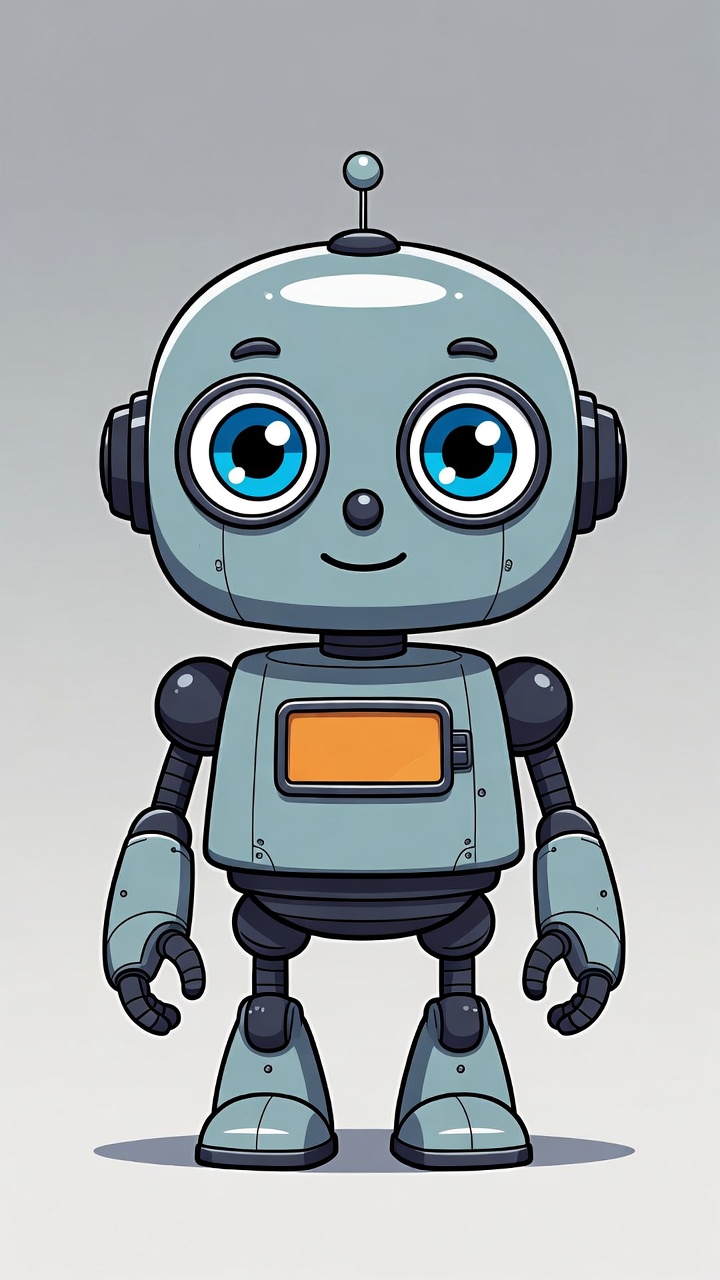
What transferred: the arm raise, the side sway, the full spin (the robot is rendered from behind mid-turn, antenna and all) and the return to the start pose, with the robot's proportions, chest panel and grey backdrop held throughout. What did not: the robot's eyes close for most of the clip, and the head tilt at the two-second mark stretches the skull. That is the honest state of hosted motion transfer in one call, at 720p, for well under a dollar; Wan 2.2 Animate's replacement mode still has no hosted equivalent, and its face-feature transfer is the thing to self-host for.
Wan 2.2 Animate vs Kling Motion Control
The nearest hosted equivalent is Kuaishou's Kling Motion Control: same core job, transfer motion from a reference video onto a character image. The honest comparison:
| Wan 2.2 Animate | Kling Motion Control 3.0 | |
|---|---|---|
| Access | Open weights, self-hosted (or Alibaba's own platforms) | Hosted API, one POST request |
| Modes | Animation + replacement | Motion transfer onto a character image |
| Replacement (swap into video) | Yes, with relighting LoRA | No |
| Max resolution | 720p (open checkpoint) | 1080p (Pro mode) |
| Inputs | Character image + source video | Prompt + character image + reference video |
| Audio | Silent output | Reference audio passthrough, on by default |
| Pose priority control | No direct equivalent | character_orientation: video or image |
| License / terms | Apache 2.0, outputs included | Commercial API terms |
Wan 2.2 Animate wins on openness and scope: replacement mode has no counterpart in the Kling endpoint, and Apache 2.0 means the outputs are yours with no usage tier attached. Kling Motion Control wins on operations: 1080p output, audio carried through from the reference, a pose-priority switch, and no GPUs to manage. If your product needs character swap inside an existing video, Wan 2.2 Animate is the tool. If it needs a character image performing a reference motion, delivered by an API you can call today, Kling is.
What you can call on an API today
UnificAlly does not serve Wan 2.2 Animate. The served routes closest to it:
Kling Motion Control 3.0 is the direct equivalent for animation mode. Three inputs, one call:
curl -X POST https://api.unifically.com/v1/tasks \
  -H "Content-Type: application/json" \
  -H "Authorization: Bearer YOUR_API_KEY" \
  -d '{
    "model": "kuaishou/kling-3.0-motion-control",
    "input": {
      "prompt": "Person dancing gracefully",
      "video_url": "https://example.com/dance-motion.mp4",
      "image_url": "https://example.com/person.jpg",
      "character_orientation": "video",
      "mode": "pro",
      "keep_audio": true
    }
  }'
Std mode returns 720p, Pro returns 1080p; current rates are on the pricing page. Kling 2.6 Motion Control is the previous generation on the same input pair, worth testing when 3.0's facial-consistency premium is not needed.
Wan 2.2 is the served route from the same model family, and the one behind every "wan 2.2 api" search. It does text-to-video and image-to-video (not motion transfer): 5-second silent videos at 480p or 1080p, $0.20 flat per video. If you go the i2v route, the Wan 2.2 image-to-video prompt guide covers the prompt patterns that work.
Every route runs in a browser playground, and new accounts start with $0.50 of balance, pay-per-use after that with no subscription.
Wan 2.2 Animate FAQ
Is it wan 2.2 animate, wan2.2 animate, or wan2 2 animate?
All the same model. The official name is Wan2.2-Animate-14B; "wan 2.2 animate", "wan2.2 animate", and "wan2 2 animate" are spacing variants of it, and "Wan-Animate" is the research paper's name for the method. If a page uses any of these, it is describing the September 2025 release covered here.
Is Wan 2.2 Animate free?
The weights are free under Apache 2.0, including commercial use of the output, so self-hosting costs only your GPU time. The official Hugging Face Space is free to try with queues. Alibaba Cloud Model Studio bills per task.
Can Wan 2.2 Animate replace a character in a video?
Yes, that is replacement mode: the model swaps your character image into the source video while keeping the original motion, scene, and camera, and a relighting LoRA matches the character to the scene's lighting. Animation mode does the reverse and moves the scene to the character image.
Is Wan 2.2 Animate on Hugging Face?
Yes, as weights. The download lives at Wan-AI/Wan2.2-Animate-14B (with a Diffusers variant and a community GGUF). The official demo Space linked from the repo returned 401 on October 19, 2026 and is no longer in Wan-AI's public Space list; the ModelScope Studio and wan.video are the hosted demos that still run.
Is there a GGUF version of Wan 2.2 Animate for low-VRAM GPUs?
Yes. befox/Wan2.2-Animate-14B-GGUF on Hugging Face is a quantized build of the official checkpoint (its card notes the face adapter tensors are kept at a slightly higher precision than other quants). Load it through ComfyUI's GGUF nodes into the official Move / Mix workflow when the full 14B checkpoint does not fit your card.
Does the Hugging Face Space do replacement mode?
The community Space's app exposes both Move Mode (animation) and Mix Mode (replacement), matching the two modes of the model. It runs on CPU hardware, though, so it will not render a usable result; use the ModelScope Studio for a hosted test of replacement, or self-host with --replace_flag --use_relighting_lora.
Can I run Wan 2.2 Animate without a GPU?
Not locally. The hosted options are the ModelScope Studio, wan.video and Alibaba Cloud Model Studio for the model itself, or a motion-transfer API such as Kling Motion Control 3.0 for the animation half of the job, as in the test above.
Can I call Wan 2.2 Animate on UnificAlly?
Not today; there is no Wan 2.2 Animate route on the platform. For motion transfer from a reference video onto a character image, Kling Motion Control 3.0 is the closest live equivalent, and Wan 2.2 covers the family's text-to-video and image-to-video at $0.20 per video.
Is there a newer version than Wan 2.2 Animate?
ComfyUI added native support for a successor, Wan Animate 2, in August 2026, with an end-to-end design that consumes driving videos directly and a Lite variant aimed at real-time use. The 2.2-generation checkpoint covered here remains the widely documented open release.
We will update this post if a Wan Animate route goes live on UnificAlly, and when the Wan team publishes full specs for Wan Animate 2. For what you can run right now, start with Kling Motion Control 3.0.