Gemini Omni 1.1 Flash vs Veo 3.1: which to use at each Veo tier, with our own generations
Verdict: Gemini Omni 1.1 Flash beats Veo 3.1 Quality on Arena and price; Veo Lite Relaxed wins drafts and Extend. Per-tier answer, cost per minute, test videos.
Our verdict after running both: pick Gemini Omni 1.1 Flash over Veo 3.1 Quality for new text-to-video, image-to-video, and reference work, and pick Veo 3.1 only for its Lite Relaxed draft tier or when a story has to run past 10 seconds through Extend. Google now sells two current video models, and the right one depends on which Veo tier you were going to use. The Gemini Omni 1.1 Flash API launched August 27, 2026 and has held #1 on Arena text-to-video since; the Veo 3.1 API has been the production workhorse since November 2025, with keyframes on every tier, Extend for chained narratives, and the cheapest draft tier of the two. Both are live on UnificAlly. Below: the tier-by-tier call, what each costs per video and per minute of output, the Arena numbers, and the videos each model made for us.
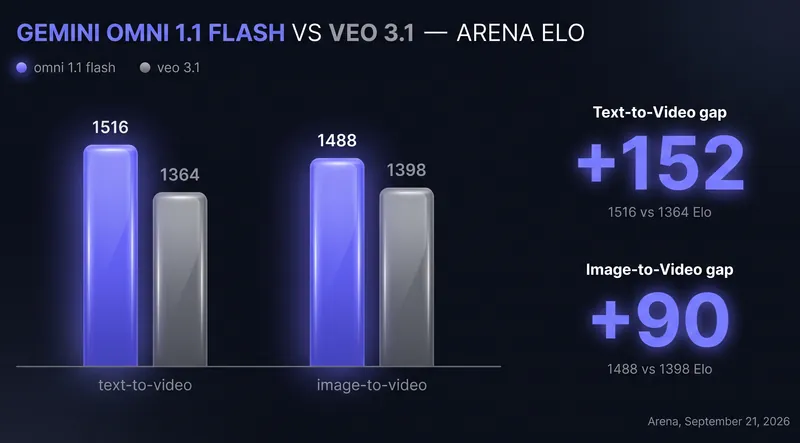
TL;DR: For most new projects, pick Gemini Omni 1.1 Flash: it leads Veo 3.1's best Arena row by about 150 Elo on text-to-video (1516 vs 1364), takes richer references (7 images plus 3 named characters vs Veo's 3 images), supports start and end keyframes, and it is the only one that edits an existing video. Pick Veo 3.1 when your pipeline chains narratives with the Extend endpoint or lives on the cheapest drafts: Lite Relaxed at $0.075 per video still undercuts Omni's $0.23 eight-second 360p draft. Omni generation costs $0.30 to $0.60 per video at 720p or 1080p on UnificAlly ($0.72 to $1.03 at 4K); Veo runs $0.075 to $1.20 at 720p.
Update (September 17, 2026): Omni 4K now carries its own rate.
Update (October 17, 2026): Arena re-pulled (board dated September 21, 2026): Omni 1.1 Flash is still #1 on text-to-video and #2 on image-to-video; Veo 3.1's best row slipped from #10 to #12 and from #11 to #13 as Sora 2 Pro, Grok Imagine 1.5 Video and HiDream passed it. Corrected the 4K comparison: Veo 3.1 also renders 1080p and 4K inside one task when you set
resolutionon the request, so the old two-task framing was wrong. Added a cost-per-minute column, our own test videos from both models, and a note on Kling 4.0 for 30-second single takes.
Omni 1.1 Flash vs Veo 3.1: key takeaways
- Arena, board dated September 21, 2026: Gemini Omni 1.1 Flash #1 on text-to-video at 1516 Elo; Veo 3.1's best row #12 at 1364. On image-to-video: Omni #2 at 1488, Veo #13 at 1398.
- Veo 3.1 pricing on UnificAlly is flat per 720p video: $0.075 (Lite Relaxed), $0.15 (Lite), $0.30 (Fast), $1.20 (Quality); 1080p and 4K cost more on every tier. Omni 1.1 generation is priced by duration: $0.30 (4s) to $0.60 (10s) at 720p, with 1080p at no extra cost, 4K at $0.72 to $1.03, and 360p drafts at $0.11 to $0.28.
- Per minute of finished 720p output, Veo Lite Relaxed is the cheapest path at $0.5625, Veo Fast costs $2.25, Omni costs $3.60, and Veo Quality costs $9.
- Omni takes up to 7 reference images plus 3 named character references and has a video-edit endpoint; Veo takes up to 3 reference images (character references on Fast and Lite tiers only) and has no edit mode.
- Both support start and end frame keyframes. Veo has Extend for chaining videos into longer narratives; Omni maxes at 10 seconds per generation on these endpoints.
- Both output video with synchronized audio in one file, in 16:9 or 9:16. Veo runs 4-8 seconds per generation, Omni 4-10 seconds.
- Both upscale to 1080p or 4K inside the generation task when you ask for it on the request. Veo also has a separate Upscale endpoint for videos you already finished at 720p, at $0.025 (1080p) and $0.60 (4K).
What each model is
Gemini Omni 1.1 Flash is Google's multimodal video model: text, images, video, and audio all sit in the model context. Its defining features are reference-driven generation (name a character, reuse it), an edit endpoint that rewrites an uploaded video from one instruction, and a 10-second context window that keeps scenes consistent across follow-up edits. It replaced the May 2026 Gemini Omni Flash; the full review is in our launch coverage.
Veo 3.1 is Google's established text-to-video and image-to-video model, live since November 2025. It ships in three quality tiers (Lite, Fast, Quality) plus a lower-priority Lite Relaxed, with the most complete production toolkit in the category: start and end frames on every tier, an Extend endpoint that continues a finished video, and 1080p or 4K either on the request or through dedicated upscalers. Full pricing breakdown in Veo 3.1 API pricing.
Specs side by side
| Gemini Omni 1.1 Flash | Veo 3.1 | |
|---|---|---|
| Duration per generation | 4, 6, 8, or 10s | 4, 6, or 8s (8s only with any reference) |
| Longest single output | 10s | 8s, plus 8s per Extend call |
| Aspect ratios | 16:9, 9:16 | 16:9, 9:16 |
| Audio | Native, same file | Native, same file |
| Resolution | 360p/720p native; 1080p/4K in-task upscale | 720p native; 1080p/4K in-task upscale, or separate Upscale endpoint for finished videos |
| Draft tier | 360p from $0.11 | Lite Relaxed at $0.075 |
| Reference images | Up to 7 | Up to 3 (character references not on Quality) |
| Character references | Up to 3 named characters, 10 images each | Yes on Fast, Lite, Lite Relaxed; 3 images total |
| Start frame | Yes | Yes (every tier) |
| End frame | Yes | Yes (every tier) |
| Extend a finished video | No | Yes, Extend endpoint |
| Edit an uploaded video | Yes, dedicated endpoint (≤30s, ≤1GB source) | No |
| Voice presets | Yes (generation and per-character in edit) | Yes |
| Seed | Yes | Yes |
The table is the argument. Omni is built around references and editing, and with keyframes on its endpoints it covers most of Veo's control surface too; what it cannot do is continue a finished video. Veo's remaining exclusives are Extend and the cheapest draft tier.
Gemini Omni 1.1 Flash vs Veo 3.1 pricing
UnificAlly bills both models per generated video, pay-per-use, no subscription. Rates come from the live price list and refresh on every deploy. The last column is what a minute of finished output costs at each tier: eight-second Veo videos times 7.5, ten-second Omni videos times 6.
| Route | Price per video | Per minute of output |
|---|---|---|
| Veo 3.1 Lite Relaxed, 720p / 1080p / 4K | $0.075 / $0.10 / $0.675 | $0.5625 at 720p |
| Veo 3.1 Lite, 720p / 1080p / 4K | $0.15 / $0.175 / $0.75 | $1.125 at 720p |
| Veo 3.1 Fast, 720p / 1080p / 4K | $0.30 / $0.325 / $0.90 | $2.25 at 720p |
| Veo 3.1 Quality, 720p / 1080p / 4K | $1.20 / $1.225 / $1.80 | $9 at 720p |
| Veo 3.1 Upscale of a finished video, 1080p / 4K | $0.025 / $0.60 | per video, added once |
| Gemini Omni 1.1 Flash generate at 720p or 1080p, 4s / 6s / 8s / 10s | $0.30 / $0.40 / $0.50 / $0.60 | $3.60 |
| Gemini Omni 1.1 Flash generate at 4K, 4s / 6s / 8s / 10s | $0.72 / $0.82 / $0.92 / $1.03 | $6.18 |
| Gemini Omni 1.1 Flash 360p draft, 4s / 6s / 8s / 10s | $0.11 / $0.17 / $0.23 / $0.28 | $1.68 |
| Gemini Omni 1.1 Flash edit, 360p / 720p or 1080p / 4K | $0.40 / $0.80 / $1.20 | per source video |
Veo wins on drafts and loses at the top. A Lite Relaxed video is a flat $0.075 against Omni's 360p draft at $0.11 for four seconds or $0.23 for eight. Veo Fast at $0.30 also beats an eight-second Omni video at $0.50. Veo Quality is where it flips: at $1.20 it costs more than Omni's $0.50 for the same eight seconds, from the model that ranks lower on Arena. 1080p is the quiet difference: Omni charges the same for 1080p as for 720p, Veo charges a little more on every tier ($0.325 for Fast instead of $0.30). 4K follows the Quality pattern: a 10-second 4K Omni video is $1.03, Veo Quality at 4K is $1.80 for eight seconds, and Veo Fast at 4K is $0.90; all three render in one task. Both models support a cheap-draft loop: iterate on Veo Lite Relaxed or Omni 360p until the prompt is right, then rerun the winner at final quality (Omni's 360p output can only be upscaled to 720p, so treat it strictly as an iteration tool).
Arena benchmarks: Gemini Omni 1.1 Flash vs Veo 3.1
Arena leaderboard positions from the board dated September 21, 2026, pulled October 17, 2026:
| Board | Gemini Omni 1.1 Flash | Best Veo 3.1 row |
|---|---|---|
| Text-to-video | #1, 1516 Elo (1,784 votes) | #12, 1364 Elo (Veo 3.1 with audio, the Quality tier here, 13,741 votes) |
| Image-to-video | #2, 1488 Elo (3,734 votes) | #13, 1398 Elo (25,116 votes) |
Context for those numbers, so the table does not oversell:
- Omni 1.1's text-to-video rating still rests on 1,784 votes with a rank spread of 1 to 4, and the board has not been re-scored since September 21. Veo's ratings sit on tens of thousands of votes and are stable.
- Veo 3.1 is not #1 anywhere on the current video boards, and it keeps slipping: since our August extraction Sora 2 Pro and Grok Imagine 1.5 Video passed it on text-to-video, and HiDream-O1 and Grok Imagine 1.5 Video passed it on image-to-video. It remains ahead of most of the field on production control, which the Arena boards do not measure.
- On image-to-video, Omni 1.1 is second to MiniMax Hailuo H3 (1495), not first. If pure image-to-video preference is your only criterion, H3 deserves a look over both Google models.
What each model produced for us
These are our own generations through the UnificAlly API, one per model, with the exact prompt. They were made for different tests, so they are not a same-prompt pair; we will add one when we run it. Each is a single generation, not a repeatability test.
Gemini Omni 1.1 Flash, image-to-video with spoken dialogue. One start image and one prompt produced the finished result: the man delivers his line out loud with the cafe ambience behind him. Settings: google/gemini-omni-flash-1.1-video, 720p, 8 seconds, 16:9.
Prompt (abridged): close smartphone selfie of a man in his late fifties in a cafe by a large window, cappuccino cup in the other hand, soft window daylight, real smartphone texture, unposed. He is saying: "Third one today. Don't tell my doctor."
Veo 3.1 Lite, text-to-video motion physics. Run on August 13, 2026 at native 720p, four seconds, 16:9, native audio, no reference media. Veo follows the roll, drop, and splash order and produces a clear discrete splash, but the marble stays visible above the water instead of settling at the bottom, so the final instruction is missed.
Prompt: "One continuous locked-off side view, no cuts: a clear glass marble rolls down a narrow wooden ramp, drops into a shallow ceramic bowl of water, creates one realistic splash and concentric ripples, then settles at the bottom. Soft daylight, neutral studio background, natural gravity and collision timing, physically plausible water motion, no slow motion, synchronized rolling and splash sound, no text."
What the pair shows, even across different prompts: Omni's dialogue sync and skin texture at 720p are the kind of output that earns its Arena lead, and Veo Lite at a fraction of the price still gets the physics mostly right. For a draft loop that is a fair trade; for a final, it is not.
Omni 1.1 Flash vs Veo 3.1: which one should you use?
Our call, having run both: default to Omni 1.1 Flash for new work, keep Veo 3.1 for structured pipelines. By Veo tier, the answer is:
- Veo 3.1 Lite Relaxed vs Omni 1.1 Flash: Veo, for drafts only. An eight-second $0.075 video costs a third of Omni's cheapest $0.23 360p draft, and Veo's draft is already 720p.
- Veo 3.1 Lite vs Omni 1.1 Flash: Veo if you are iterating and can live without references past three images; Omni once the output has to be good, because Lite's output is Lite Relaxed's output on a faster queue.
- Veo 3.1 Fast vs Omni 1.1 Flash: close on price ($0.30 vs $0.50 for eight seconds), not close on Arena. Omni unless you need Extend.
- Veo 3.1 Quality vs Omni 1.1 Flash: Omni. It costs less for the same eight seconds, ranks about 150 Elo higher, and gives you 1080p at no extra charge. The only reason to run Quality is a pipeline already built on Veo's seeds, frames, and Extend.
Pick Gemini Omni 1.1 Flash when:
- Output quality per prompt is the priority; the Elo gap is large enough to see in blind side-by-sides.
- Your workflow is reference-heavy: consistent characters, product stills, style references.
- You need to edit existing videos with a prompt. Nothing else from Google does this.
- You need keyframe transitions at top visual quality: both models take start and end frames, and Omni ranks far higher on output.
- You want 1080p without paying extra for it.
Pick Veo 3.1 when:
- You chain videos into longer narratives with Extend. Omni stops at 10 seconds per generation on these endpoints.
- You iterate heavily before committing. An eight-second $0.075 draft costs well under Omni's $0.23 equivalent, and at volume that compounds.
- You want a known 24 FPS deliverable spec that has been stable in production for months.
If the real requirement is one continuous take longer than 10 seconds without stitching Extend calls, neither Google model is the answer today. The newer alternative is the Kling 4.0 API, live on UnificAlly since October 15, 2026: 3 to 30 seconds in a single generation at 720p or 1080p, up to 10 reference images, keyframes with up to 8 middle frames, and stereo audio in the same pass. It has no Arena row yet, so test it on your own prompts before moving a pipeline.
The wrong reason to pick Veo is loyalty to the familiar option: for straight text-to-video, reference-to-video, and keyframe work, the blind-preference gap is real and the request bodies are similar enough that switching costs an afternoon. The wrong reason to pick Omni is the leaderboard alone: if your pipeline depends on Extend or draft volume, a higher Elo does not compensate.
How to access the Gemini Omni and Veo 3.1 APIs
Both run through the same async task API. Omni 1.1:
curl -X POST https://api.unifically.com/v1/tasks \
  -H "Content-Type: application/json" \
  -H "Authorization: Bearer YOUR_API_KEY" \
  -d '{
    "model": "google/gemini-omni-flash-1.1-video",
    "input": {
      "prompt": "A slow dolly across a rain-soaked neon street, reflections rippling",
      "duration": 8,
      "aspect_ratio": "16:9",
      "resolution": "1080p"
    }
  }'
Veo 3.1 Fast with a start and end frame:
curl -X POST https://api.unifically.com/v1/tasks \
  -H "Content-Type: application/json" \
  -H "Authorization: Bearer YOUR_API_KEY" \
  -d '{
    "model": "google/veo-3.1-fast",
    "input": {
      "prompt": "The camera pushes in as the scene transitions from day to night",
      "start_image_url": "START_IMAGE_URL",
      "end_image_url": "END_IMAGE_URL",
      "aspect_ratio": "16:9"
    }
  }'
Both return a task_id to poll at GET /v1/tasks/<task_id>. Try either in the browser first: Omni 1.1 playground, Veo 3.1 playground.
Omni 1.1 Flash vs Veo 3.1 FAQ
Is Gemini Omni 1.1 Flash better than Veo 3.1?
On blind human preference, yes: on the Arena board dated September 21, 2026 it leads Veo 3.1's best row by about 150 Elo on text-to-video (1516 vs 1364) and 90 on image-to-video (1488 vs 1398). Veo 3.1 still wins on production control: the Extend endpoint, character references on its cheaper tiers, and the cheapest drafts.
Is Veo 3.1 cheaper than Gemini Omni 1.1 Flash?
On the lower tiers, yes. Veo 3.1 Lite Relaxed ($0.075), Lite ($0.15), and Fast ($0.30) all cost less than an eight-second Omni 1.1 video at $0.50. Veo 3.1 Quality at $1.20 costs more than any 720p or 1080p Omni generation, which tops out at $0.60 for 10 seconds. For 4K, Omni runs $0.72 to $1.03, while Veo Quality at 4K is $1.80 and Veo Fast at 4K is $0.90, each in one task. Check the pricing page for current rates on both.
Can Veo 3.1 edit an existing video?
No. Veo 3.1 generates from text, frames, and reference images, and can extend its own finished videos, but it cannot take an uploaded video and modify it. Video editing is Gemini Omni 1.1 Flash's territory via google/gemini-omni-flash-1.1-video-edit. If the edit is a swap (a new outfit, prop, or product from a reference photo), the HappyHorse 1.0 Video Edit API is the other editor worth testing on UnificAlly.
Does Gemini Omni 1.1 Flash support first and last frames like Veo 3.1?
Yes. Both models accept a start and an end frame: Omni 1.1 via start_image_url and end_image_url on its generate endpoint, Veo 3.1 on every tier. For keyframe transitions the choice now comes down to output quality and price rather than capability, and on quality Omni holds the large Arena lead.
Can Gemini Omni 1.1 Flash make a 40-second or one-minute video?
Not on the UnificAlly endpoints today. Google's own stack extends Omni scenes in 10-second steps to a cumulative 40 seconds, but that scene extension has not reached this API, so a single Omni generation is 4 to 10 seconds. For longer output you have two options here: chain Veo 3.1 Extend calls in 8-second steps, or generate one continuous take of up to 30 seconds with Kling 4.0. We will update this post when Omni scene extension lands.
Which is better for image-to-video?
Neither is the outright leader. On the Arena image-to-video board (dated September 21, 2026), MiniMax Hailuo H3 ranks #1 at 1495 Elo, Gemini Omni 1.1 Flash #2 at 1488, and Veo 3.1's best row #13 at 1398. Between the two Google models, Omni is clearly ahead; across the market, test H3 too.
Are both models available through one API?
Yes. UnificAlly serves both through the same /v1/tasks endpoint and API key, so you can route per job: Omni for reference-led generations and edits, Veo for keyframe transitions and extended narratives.
Related reading on Omni 1.1 Flash vs Veo 3.1
- Gemini Omni 1.1 Flash API: pricing and how to access it: full launch review.
- Veo 3.1 API pricing: every Veo tier, endpoint, and rate.
- Gemini Omni Flash 1.1 model page and Veo 3.1 model page: playgrounds and parameters.
- Veo 3.1 vs SeeDance 2.0: how Veo stacks up outside Google's lineup.
- Kling 4.0 API: the 30-second single-take alternative to both.
Arena numbers move in a launch window; we re-extract them on every edit to this post. Keyframes and 360p drafts already reached Omni's endpoints in launch week and are reflected above; the next thing that would move the verdict is Omni scene extension on these endpoints, which would erode Veo's Extend advantage, and a Kling 4.0 Arena row. We will update when either lands.